
A Message-Driven Bean Example


Introduction
Session beans allow you to send JMS messages and to
receive them synchronously, but not asynchronously. To receive messages
asynchronously, a Message-driven bean is used. Message driven beans are the light weight components used for
communication via messages (e.g., email or IM messages). In
message driven beans, the messaging service is in asynchronous mode because the
user is not intended to get the instant result.
Message-driven beans can implement any messaging type. Most commonly, they
implement the Java Message Service (JMS) technology.
Message-driven beans have the following characteristics:
-
A message-driven bean's instances retain no data or conversational state for a specific client i.e. they are stateless.
-
A single message-driven bean can process messages from multiple clients.
-
They are invoked asynchronously.
-
They can be transaction-aware.
-
They do not represent directly shared data in the database, but they can access and update this data.
-
A message-driven bean has only a bean class i.e. unlike a session bean, the clients don't access message-driven beans through interfaces.
-
They don't have the remote or local interfaces that define client access.
The given diagram shows the working process of a Message driven bean.

In Message driven beans (MDB), the client components don't locate message-driven beans and invoke methods directly. Instead, The JMS clients send messages to message queues managed by the JMS server (e.g., an email inbox can be a message queue) for which the javax.jms.MessageListener interface is implemented. The message queue is monitored by a special kind of EJB(s) - Message Driven Beans (MDBs) That processes the incoming messages and perform the services requested by the message. The MDBs are the end-point for JMS service request messages. You assign a message-driven bean?s destination during deployment by using Application Server resources.
JMS:
The Java Message Service (JMS) is an API for Java
messaging clients. JMS provides two programming models: point-to-point
and publish-and-subscribe.
In the point-to-point model, one sender puts a message on a queue that is
delivered to only one receiver. The publish-and-subscribe model adds a broadcast
mode in which any number of senders can add messages to a topic, and any
number of recievers receive all messages posted to topics. JMS queues and topics
are bound in the JNDI environment and made available to J2EE
applications.
Example:
Our application assumes the point-to-point model, and requires setting up a queue with a QueueConnectionFactory in JMS. This section shows, how to implement an MDB with EJB 3.0 describing the source code of a simple message-driven bean application.
In this example, we are going to implement a Message-driven bean application named "massage" that has the following components:
-
A client application that sends several messages to a queue: MessageClient
-
A message-driven bean that asynchronously receives and processes the messages that are sent to the queue: MessageBean
Code for the client application:
|
package mdb;
|
Description of the given code:
In the given code of MessageClient application, the javax.jms.* package is imported for extending the Queue, QueueConnectionFactory, QueueConnection, QueueSender, and QueueSession class.
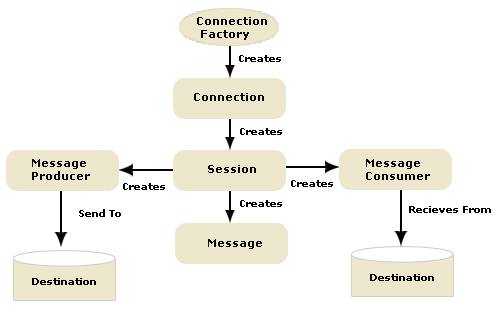
After you get the QueueConnectionFactory object, you use its createQueueConnection to construct a QueueConnection object, like this:
connection = factory.createQueueConnection( );
Then, you use the createQueueSession method of the QueueConnection interface to create a QueueSession object, as in the following code:
session = connection.createQueueSession(false, QueueSession.AUTO_ACKNOWLEDGE);
Note that you pass false as the first argument to the createQueueSession method to indicate that you are not creating a transactional session object. 0
Next, you can call the createSender method of the QueueSession interface, passing a Queue object. The return value of this method is a message producer, which is a QueueSender:
sender = session.createSender(queue);
Then you create a TextMessage object based on the message received by passing the text for the TextMessage to the createTextMessage method of the QueueSession object and then set the text to the object of TextMessage 1
TextMessage msg =
session.createTextMessage( );
msg.setText("This is my sent message " + (i + 1));
Now, you are ready to send the new message. You do this by calling the send method of the QueueSender object, as you see here:
sender.send(msg); 2
The JMS resource is mapped to the JNDI name of the destination from which the bean receives messages. The New Message-Driven Bean wizard has already created the JMS resources for us. The EJB 3.0 API enables us to look up objects in the JNDI namespace from within the bean class so that we do not need to configure deployment descriptors to specify the JMS resources. The EJB 3.0 specifications allow us to use annotations to introduce resources directly into a class.
The MDB's connection process can be seen in the figure shown below:
 3
3
javax.annotation.Resource(@Resource):
The @Resource method specifies a
dependence on an external resource, such as a JDBC data source or a JMS
destination or connection factory.
If you specify the annotation on a field or method, the EJB container
injects an instance of the requested resource into the bean when the bean is
initialized. If you apply the annotation to a class, the annotation declares a
resource that the bean will look up at runtime.
The mappedName attribute of the annotation Resource specifies the global JNDI name of the dependent resource. For example: 4
@Resource(mappedName
="jms/Queue")
Specifies that the JNDI name of the dependent resources is jms/Queue and deployed in the JEE Server JNDI tree.
For Web-client: 5
In a Web-client application "jms/Queue" and ConnectionFactory" argument
are used in the JNDI lookup. Both are logical JNDI names, and use
the outbound connectivity provided by the JMS resource adapter. Make
the JNDI lookup to use a Web Service shown as.
InitialContext ctx = new InitialContext();jms/Queue"); |
Code for the message-driven bean: 6
The MessageBean class demonstrates the following requirements to its implementation:
-
In EJB 3.0, the MDB bean class is annotated with the @MessageDriven annotation that specifies, which message queue monitors the MDB (i.e., jms/Queue). If the queue does not exist, the EJB container automatically creates it at deploy time. There is no XML configuration file needed!
For the Application Server, the @MessageDriven annotation typically contains a mappedName attribute that specifies the JNDI name of the destination from which the bean will consume messages.
- The class must be defined as public and must contain
a public constructor with no arguments. It must not define the finalize
method.
-
It is recommended, but not required, that a message-driven bean class should implement the MessageListener interface for the message type it supports. This interface defines only one method onMessage( ). When the EJB container arrives a message, it calls the onMessage( ) method of the message-driven bean to process the message. The onMessage( ) method contains the business logic and handles the processing of the message in accordance with the application?s business logic. It can call helper methods, or invoke a session bean to process the information in the message or to store it in a database.
A message is delivered to a message-driven bean within a transaction context, so all operations within the onMessage method are part of a single transaction. If message processing is rolled back, the message will be redelivered.
In our example, the MessageBean.onMessage( ) method retrieves the message body, parses out the messages to a TextMessage, perform the necessary business logic, and displays the text to the message-client.
-
A message-driven bean can also inject a MessageDrivenContext resource which is commonly used to call the setRollbackOnly method to handle exceptions for a bean during container-managed transactions.
| package mdb;
import javax.ejb.*;
private static
final Logger logger; |
Logger:
When writing log messages from EJBs within JRun, you have the following options:
- Nonportable Use JRun-specific methods and services. These methods write to the JRun server's event log.
- Portable Use one of the System.out.println methods. These methods write to the console (if used when starting JRun).
An EJB can acquire a logger instance from the container and use the logger's info( ) method to display the messages for the client-end, as shown in the following code examples: 8
logger.info("MESSAGE BEAN: Message received: " + msg.getText( ));
Packaging, Deploying, and Running the message application.
To create and package the application using Ant, use the default target for the build.xml file: 9
ant
This target packages the application client and the message-driven bean, then creates a file named message.ear in the dist directory.
You simply avoid having to create deployment descriptor files for the message-driven bean and application client by using resource injection and annotations. You need to use deployment descriptors only if you want to override the values specified in the annotated source files. 0
To deploy the application and run the client using Ant, use the following command:
ant run
The output in the terminal window looks like this: 1
In the server log file, the following lines should be displayed, wrapped in logging information:
MESSAGE BEAN: Message received: This is my sent
message 1
MESSAGE BEAN: Message received: This is my sent message2
MESSAGE BEAN: Message received: This is my sent message 3
MESSAGE BEAN: Message received: This is my sent message 4