
How to generate build.xml file


This example shows how to generate the build.xml file. You may say that build.xml file is the backbone of ANT (Another Neat Tool) technology. Each build.xml file contains only one project name and at least one target. The project tag has only three attributes:
|
Project |
|
Attribute |
Description |
Requirement |
|
name |
project name |
not necessary |
|
default |
target name which called by default |
not necessary |
|
basedir |
the base directory having all path, it contain absolute path |
not necessary |
|
<project name="My Project" default="compile" basedir="."> |
The project tag is used to create our project and its attributes are used to handle further processing of the project. The name attribute is used to specify the project name and the default attribute is used to specify which target will be called as default when the program will run and the basedir attribute is used to calculate the absolute path of the parent directory.
An another tag is Target tag which has following five attributes:
|
Target |
|
Attribute |
Description |
Requirement |
|
name |
target name |
necessary |
|
depends |
depends on another target 0 |
not necessary |
|
if |
the name of the property that must be set in order for this target to execute. 1 |
not necessary |
|
unless |
the name of the property that must not be set in order for this target to execute. 2 |
not necessary |
|
description |
short description about target 3 |
not necessary |
|
<target name="buildWar" depends="init" description="build a war file"/> 4 <target name="init" if="build"/> <target name="init" unless="build"/> |
In the target tag, name attribute is used for target name and the depends attribute is used to give sequence of target, i.e., which target will execute first, one target may depend on one or more other targets. The if attribute is used in case of condition, whether property exists or not; then this target will be executed and unless attribute is used as like else condition whether property does not exist, the target will not be executed and the description attribute is used for only giving details about target. 5
Next tag is property tag which has following four attribute:
|
Property |
6
|
Attribute |
Description |
Requirement 7 |
|
name |
name of the property, which is case-sensitive |
not necessary 8 |
|
value |
name of task attribute, this is done by placing the
property name between " |
necessary 9 |
|
location |
it contain property name |
not necessary 0 |
|
file |
name of the property file |
not necessary 1 |
|
<property name="build" value="${build}"/> <property name="src" location="src"/> 2 <property file="build.properties"/> |
In the property tag, name attribute is used for property name; it is case sensitive. The value tag is used to give the task which will be the name of property in this format "${name}", and the location tag is used to specify the location of task where it performs and the file tag is used to import all properties of ant file. The complete build.xml file structure is as follows:
|
<project name="My Project"
default="jar" basedir="."> |
The above build.xml file is used to create directory, compile source code, create jar file and clean the directory if already exists. To check the program, simply copy and paste the above code and give appropriate path; then run with ant command on the command prompt. The output is as follows:
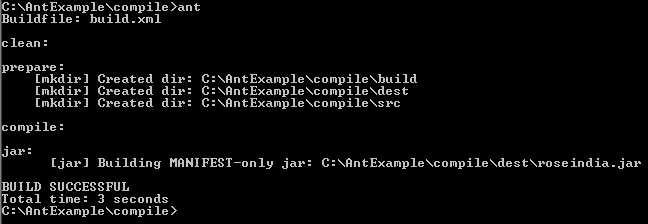
The output shows that a jar file named roseindia.jar is created but in this jar file only manifest file is created. When you make a java file in the src folder and run with ant command, the jar file is created completely. 4
|
class Hello |
To check your program, compile it with ant command on the console; then the following output will be displayed:
 5
5
