
To generate a PDF in struts you need to use struts stream result type as follows
<result name="success" type="stream">
	<param name="contentType">image/jpeg</param>
	<param name="inputName">fileStream</param>
	<param name="contentDisposition">attachment;filename="document.pdf"</param>
	<param name="bufferSize">1024</param>
</result>
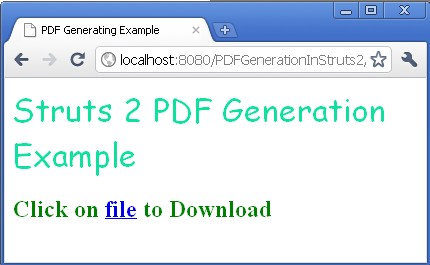
An example of PDF Generating is given below
index.jsp
<%@ taglib prefix="s" uri="/struts-tags"%>
<head>
<title>PDF Generating Example</title>
</head>

<body>
<font color="megenta" size="6" face="Comic Sans MS">Struts 2 PDF
Generation Example</font>
<br clear="all" />
<br clear="all" />

<s:url action="download" id="copy"></s:url>

<strong><font color="green" size="5" face="arier">Click
on <s:a href="%{copy}">file</s:a> to Download</font></strong>
</body>PDFGeneratingAction.javaADS_TO_REPLACE_1
package net.roseindia;

import java.io.File;
import java.io.FileInputStream;
import java.io.InputStream;

import com.opensymphony.xwork2.ActionSupport;

public class PDFGeneratingAction extends ActionSupport {
	private static final long serialVersionUID = 1L;

	private InputStream fileStream;

	public InputStream getFileStream() {
		return fileStream;
	}

	public void setFileStream(InputStream fileStream) {
		this.fileStream = fileStream;
	}

	@Override
	public String execute() throws Exception {
		// TODO Auto-generated method stub
		fileStream = new FileInputStream(new File("C:\\downloadfile.txt"));
		return SUCCESS;
	}
}
struts.xml
<?xml version="1.0" encoding="UTF-8" ?>
<!DOCTYPE struts PUBLIC
"-//Apache Software Foundation//DTD Struts Configuration 2.0//EN"
"http://struts.apache.org/dtds/struts-2.0.dtd">

<struts>

<constant name="struts.custom.i18n.resources" value="global" />
<constant name="struts.devMode" value="true" />

<package name="roseindia" namespace="/" extends="struts-default">

<action name="pdfDownload">
<result>resources/index.jsp</result>
</action>

<action name="download" class="net.roseindia.PDFGeneratingAction">
<result name="success" type="stream">
<param name="contentType">image/jpeg</param>
<param name="inputName">fileStream</param>
<param name="contentDisposition">attachment;filename="document.pdf"</param>
<param name="bufferSize">1024</param>
</result>
</action>

</package>

</struts>
 |
Another Example of
Creating PDF in strutsADS_TO_REPLACE_2
How to insert image in PDF file in struts2
How to set pdf background color.
Advertisements
Ads
Ads
