
Logic Empty Tag (<logic:empty>...</logic:empty>)


empty tag - If the requested variable is either null or an empty string then we use this tag to evaluate the contents contained in the nested body parts of this tag.
Tag evaluation of the nested body content occurs only if the specified value is
either absent (i.e. null), an empty string (i.e. a java.lang.String
with a length of zero), or an empty java.util.Collection or java.util.Map
(tested by the isEmpty() method on the respective interface).
Attributes of Empty Tag
| Attribute Name | Description |
|---|---|
| name |
This attribute specifies a JSP bean variable which is required to make comparison. |
| property |
The variable contains the property
of the bean which is required to make comparison and is specified
by the |
| scope |
This specifies the bean scope within which
the bean
is searched by the |
Logic notEmpty Tag (<logic:notEmpty>...</logic:notEmpty>)
notEmpty
- If the requested variable is neither null nor an empty
string then we use this tag to evaluate the contents contained in the nested
body parts of this
tag.
Tag evaluation of the nested body content occurs only if the specified value is
available (i.e.not null) and is not an empty string (i.e. a java.lang.String
with a length of zero).
Attributes of notEmpty Tag
| Attribute Name | Description |
|---|---|
| name |
This attribute specifies a JSP bean variable which is required to make comparison. |
| property |
The variable contains the property
of the bean which is required to make comparison and is specified
by the |
| scope |
This specifies the bean scope within which the bean
is searched by the |
Example Illustrating the use of the Empty<logic:empty> and the notEmpty <logic:notEmpty> logic tags.
Here you will learn to use the Struts Logic tags. We will cover an example that will show a comparison between the two logic tags (ie..<logic:empty> and the <logic:notEmpty>).
Example code
Creating an Action Class
Develop a simple action class EmptyAction.java.
|
Creating Form Bean
Our form bean class contains only one property text.
Here is the code of FormBean (EmptyForm.java)
|
Defining form Bean in struts-config.xml file
Add the following entry in the struts-config.xml file for defining the form bean
| <form-bean name="EmptyForm" type="roseindia.net.EmptyForm"/> |
Developing the Action Mapping in the struts-config.xml
Here, Action mapping helps to select the method from the Action class for specific
requests.
| <action path="/EmptyAction" type="roseindia.net.EmptyAction" name="EmptyForm" scope="request" input="/pages/input.jsp"> <forward name="success" path="/pages/output.jsp"/> </action> |
Developing the input.jsp page
| <%@ taglib uri="/tags/struts-html" prefix="html" %> <%@ taglib uri="/tags/struts-logic" prefix="logic" %> <html:html> <head> <title>Using <logic> Tags</title> </head> <body> <h1>Using <logic> Tags</h1> <html:form action="/EmptyAction" method ="post"> <h2>Enter your name:</h2> <html:text property="text"/> <br> <br> <html:submit value="Submit"/> <html:cancel/> </html:form> </body> </html:html> |
Developing the output.jsp page
| <%@ taglib uri="/tags/struts-bean" prefix="bean" %> <%@ taglib uri="/tags/struts-logic" prefix="logic" %> <HTML> <HEAD> <TITLE>Here's Your Data...</TITLE> </HEAD> <BODY> <H3>Here's Your Data...</H3> <h4>The text field text:</h4> <bean:write name="EmptyForm" property="text"/> <logic:notEmpty name="EmptyForm" property="text" scope="request"> <h4>Using the tag <logic:notEmpty > </h4> Results:not Empty </logic:notEmpty> <logic:empty name="EmptyForm" property="text" scope="request"> <h4>Using the tag<logic:empty ></h4> Results: Empty </logic:empty> </BODY> </HTML> |
Add the following line in the index.jsp to call the form.
<li>
<html:link page="/pages/input.jsp">Struts File Upload</html:link>
<br>
Example demonstrates how EmptyAction Class works.
</li>
Building and Testing the Example
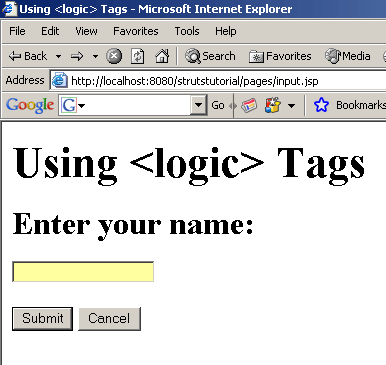
To build and deploy the application go to Struts\Strutstutorial directory and type ant on the command prompt. This will deploy the application. Open the browser and navigate to the input.jsp page. Your browser displays the following page.
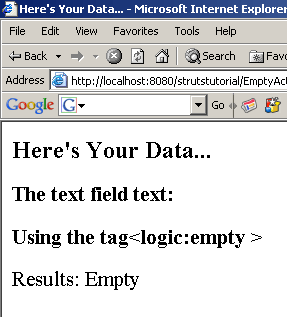
Writing nothing to the out.jsp page displays the working of the Empty Logic tag <logic:empty >
 |
Writing nothing displays the following out.jsp page
 |
Now write any data to the input.jsp to see the working of the notEmpty logic tag <logic:notEmpty > 0
 |
The <logic:notEmpty > evaluated here displays the output.jsp as
 |