
Struts LookupDispatchAction Example


Struts LookupDispatch Action (org.apache.struts.actions.LookupDispatchAction) is one of the Built-in Actions provided along with the struts framework.
.The org.apache.struts.actions.LookupDispatchAction class.is a subclass of org.apache.struts.actions.DispatchAction class.This class enables a user to collect related functions into a single action class. It eliminates the need of creating multiple independent actions for each function. Here in this example you will learn more about Struts LookupDispatchAction that will help you to grasp the concept better.
Let's develop a class LookupDispatch_Action which is a sub class of org.apache.struts.actions.LookupDispatchAction class. This class does not provide an implementation for the execute() method because DispatchAction class itself implements this method. LookupDispatchAction class is much like the DispatchAction class except that it uses a Java Map and ApplicationResource.properties file to dispatch methods . At run time, this class manages to delegate the request to one of the methods of the derived Action class. Selection of a method depends on the value of the parameter passed from the incoming request. LookupDispatchAction uses this parameter value to reverse-map to a property in the Struts Resource bundle file (ie..ApplicationResource.properties). This eliminates the need of creating an instance of ActionForm class.
LookupDispatch_Action class contains multiple methods ie.. add() , edit() , search() , save() . Here all the methods are taking the same input parameters but each method returns a different ActionForward like "add" in case of add() method , "edit" in case of edit() etc. Each ActionForward is defined in the struts-config.xml file (action mapping is shown later in this page).
Notice the implementation of the getKeyMethodMap()method.This method is required to map the names of the keys in the Struts Resource bundle file (ie..ApplicationResource.properties) to the methods in the class. The key values in the bundle file are matched against the value of the incoming request parameter ( which is specified in the action tag through struts-config.xml file). Then this matching key is mapped to the appropriate method to execute ,the mecahanism is implemented through the getKeyMethodMap()and can be defined as key-to-method mapping.
Here is the code for Action Class
package roseindia.net; |
No need to Develop an ActionForm Class
Instead create an Application Resource Property File:
Application.properties
in the same directory structure where classes are saved.
| roseindia.net.add=add roseindia.net.edit=edit roseindia.net.search=search roseindia.net.save=save |
Add the following, Message Resources Definitions in struts-config.xml
| <message-resources parameter="roseindia.net.ApplicationResources" /> |
Develop the following Action Mapping in the struts-config.xml
Here, Action mapping helps to select the method from the Action class for specific requests. Note that the value specified with the parameter
attribute is used to delegate request to the required method of the LookupDispatch_Action Class.
| <action path="/LookupDispatchAction" type="roseindia.net.LookupDispatch_Action" parameter="parameter" input="/pages/LookupDispatchAction.jsp" name="LookupDispatchActionForm" scope="request" validate="false"> <forward name="add" path="/pages/LookupDispatchActionAdd.jsp" /> <forward name="edit" path="/pages/LookupDispatchActionEdit.jsp" /> <forward name="search" path="/pages/LookupDispatchActionSearch.jsp"/> <forward name="save" path="/pages/LookupDispatchActionSave.jsp" /> </action> |
Developing jsp page
Code of the jsp (LookupDispatchAction.jsp) to delegate requests to different jsp pages :
| <%@ taglib uri="/WEB-INF/struts-bean.tld" prefix="bean"%> <%@ taglib uri="/WEB-INF/struts-html.tld" prefix="html"%> <html:html locale="true"> <HEAD> <TITLE>Dispatch Action Example</TITLE> <BODY> <H3>Dispatch Action Example</H3> <p><html:link page="/LookupDispatchAction.do?parameter=add">Call Add Section</html:link></p> <p><html:link page="/LookupDispatchAction.do?parameter=edit">Call Edit Section</html:link></p> <p><html:link page="/LookupDispatchAction.do?parameter=search">Call Search Section</html:link></p> <p><html:link page="/LookupDispatchAction.do?parameter=save">Call Save Section</html:link></p> </html:html> |
Add the following line in the index.jsp to call the form.
| <li> <html:link page="/pages/LookupDispatchAction.jsp">Struts File Upload</html:link> <br> Example demonstrates how LookupDispatchAction class works. </li> |
Building and Testing the Example
To build and deploy the application go to Struts\Strutstutorial directory and type ant on the command prompt. This will deploy the application. Open the browser and navigate to the LookupDispatchAction.jsp page. Your browser displays the following LookupDispatchAction page.
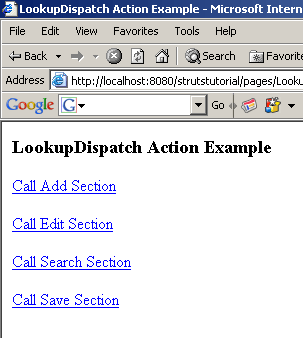
Selecting Call Add Section displays the following LookupDispatchActionAdd.jsp page

Selecting Call Edit Section displays the following LookupDispatchActionEdit.jsp page

Selecting Call Search Section displays the following LookupDispatchActionSearch.jsp page

Selecting Call Save Section displays the following LookupDispatchActionSave.jsp page


