@WebServlet
This section contains detailed description of @WebServlet annotation and its implementation with sample code.
@WebServlet annotation is included in Servlet 3.0 in Java EE6. Prior to Servlet 3.0, you need to register the Servlet using deployment descriptor(web.xml) by employing <servlet> or <servlet-mapping> tags. Now , you can do this by using @WebServlet annotation.
The @WebServlet annotation or any annotation works only if classes having annotation is located inside WEB-INF/classes directory of the web application or if it is packaged inside a jar file, it must be situated inside WEB-INF/lib directory. If you are using eclipse, you can put the Servlet/classes inside src directory.
The elements of the @WebServlet are given below :
Element |
Description |
| asyncSupported | If asynchronous operation is supported by servlet, it should be set to true otherwise false. Default is false. |
| description | It contains the description of the Servlet. |
| displayName | It contains the display name of the Servlet. |
| initParams | It contains the Servlet's init parameters. |
| largeIcon | It contains the large icon's URL string. |
| loadOnStartup | It is used to sets the load-on-startup priority of the Servlet. |
| name | It is used to set the name of the Servlet. |
| smallIcon | It contains the small icon's URL string. |
| urlPatterns | It is used to describe the URL patterns of the Servlet. |
| value | It is also used to describe the URL patterns of the Servlet. You need to implement one, either urlPatterns or value. |
The web application's deployment descriptor have a new "metadata-complete" property . If it is sets true, annotations present in application's classes , and web fragments is ignore by the deployment tool. If it sets false, annotations present in application's classes , and web fragments is examine by the deployment tool.
The tools and technology used in the example is given below :
- Eclipse Helios 3.6.1
- Tomcat 7
- jdk1.6.0_18
EXAMPLE
In the below example, a simple Servlet is annotated with @WebServlet annotation. This Servlet below will output a sequence of lines or messages on execution :
package roseindia;

import java.io.IOException;
import java.io.PrintWriter;

import javax.servlet.ServletException;
import javax.servlet.annotation.WebServlet;
import javax.servlet.http.HttpServlet;
import javax.servlet.http.HttpServletRequest;
import javax.servlet.http.HttpServletResponse;

@WebServlet(name = "WebServletAnnotation", urlPatterns = { "/WebServletAnno",
"/ServletAnno" })
public class WebServletAnnotation extends HttpServlet {
public void doGet(HttpServletRequest req, HttpServletResponse res)
throws ServletException, IOException {
res.setContentType("text/html");

PrintWriter out = res.getWriter();

// Writing response to display on page
out.write("<html><head><title>@WebServlet Annotation</title></head>");
out.write("<body>");
out.write("<h2>@WebServlet Annotation Example</h2>");
out.write("<h3>WELCOME TO <font color='RED'>ROSEINDIA </font>!!!!</h3>");
out.write("<p>This is page is displayed by the servlet having @WebServlet annotataion</p>");
out.write("</body>");
out.write("</html>");
}
}
OUTPUT
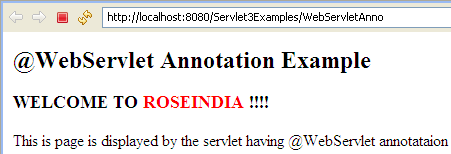
When you execute the above Servlet, you will get the following output :