In this example you will learn In this section, you will learn how to get the size of specified folder.
Java get Folder Size
--Ads--
Java get Folder Size
In this section, you will learn how to get the size of specified folder.
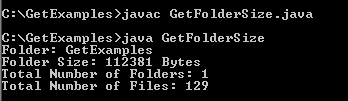
In the given example, we are going to show you the size of specified folder
and also the number of files and folders that are presented in the specified
folder. We have create a method getFileSize() in order to obtain the size
of folder. The totalFolder++ counts the total folders and totalFile++
counts the total files.
Here is the video tutorial of "How to get Folder Size in Java?":
folder.getName()-This method returns the folder name.
folder.listFiles()- This method returns an array of files presented in
the specified folder.
filelist[i].length()- This method returns the length of files
presented in the specified folder.
Following code will calculate the size of folder in bytes.
long fileSizeByte=size.getFileSize(new File(folder))