JavaScript Pop Up Boxes
JavaScript Pop Up Boxes: JavaScript provides three kind of pop-up boxes: alert, confirm, prompt. Every pop-up box has its own importance. This tutorial will help you to learn these pop-up boxes and their use in a web page. Examples and the figure will illustrate each pop-up box.
JavaScript Pop Up Boxes: JavaScript provides three kind of pop-up boxes: alert, confirm, prompt. Every pop-up box has its own importance. This tutorial will help you to learn these pop-up boxes and their use in a web page. Examples and the figure will illustrate each pop-up box.JavaScript Pop Up Boxes
JavaScript has three kind of pop-up boxes,
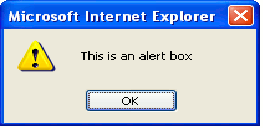
i) Alert-Box: If some surety is required from the user or an alert message is to generate then we can use alert box, user has to click ok button to proceed.
ii) Confirm Box: This box is used when some confirmation is required from user, it has ok and cancel button. Ok button returns true value and Cancel button returns false value.
iii) Prompt Box: This box is used when the web page needs some input from user, it has ok and cancel button. Ok button returns the value entered by the user and cancel button returns null value.
Example 1 (Alert Box):
<html>
<head>
<script type="text/javascript">
alert("This is an alert box");
</script>
</head>
</html>
Output:
Example 2 (Confirm Box):
<html>
<head>
<script type="text/javascript">
var a=confirm("This is a cofirm box");
if(a==true)
{
	document.write("You have clicked ok");
}
else
{
	document.write("You have clicked cancel");
}
</script>
</head>
</html>
Output:
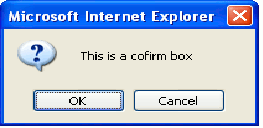
If you click OK button:
You have clicked ok
If you click cancel button:
You have clicked cancel
Example 3 (Prompt Box)
<html>
<head>
<script type="text/javascript">
var a=prompt("Enter your age"," ");
if(a>=18)
{
	document.write("Eligible to cast your vote");
}
else
{
	document.write("Sorry you are not Eligible");
}
</script>
</head>
</html>
Output:
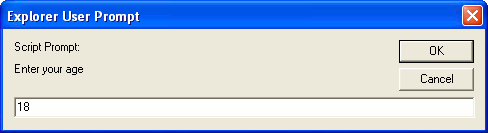
if you enter equal or more than 18 output will be displayed on the browser as follows:
Eligible to cast your vote
Otherwise:
Sorry you are not Eligible


