NumberFormatter in Flex4
The NumberFormatter class formats the decimal rounding and precision, thousand separator and negative sign.
The NumberFormatter class formats the decimal rounding and precision, thousand separator and negative sign.NumberFormatter in Flex4:
The NumberFormatter class formats the decimal rounding
and precision, thousand separator and negative sign. for
example,203.4567=203.456 . You can use the precision property for decimal
length. If an error occurs this error is saved to the error property. The error
property has two types of error values: Invalid value, Invalid format. The tag
of NumberFormatter is <mx:NumberFormatter>.
You will be declare a formatter in <fx:Declarations> tag.
Example:
|
<?xml version="1.0" encoding="utf-8"?> <s:Application xmlns:fx="http://ns.adobe.com/mxml/2009"xmlns:s=" library://ns.adobe.com/flex/spark"xmlns:mx=" library://ns.adobe.com/flex/mx"minWidth=" 955" minHeight="600"><![CDATA[ import mx.events.ValidationResultEvent;{ result = numValidate.validate(); if (result.type==ValidationResultEvent.VALID) {numval.text= numberFormatter.format(numtxt.text); } else {numval.text= "Invalid Number";} } ]]> useThousandsSeparator="true" useNegativeSign="true"/> <mx:NumberValidator id="numValidate" source="{numtxt}" property="text" allowNegative="true"
domain="real"/> <s:Panel title="NumberValidator Example" width="506"> <mx:Form
backgroundColor="#096465"
width="504"> </s:Application> |
Output:
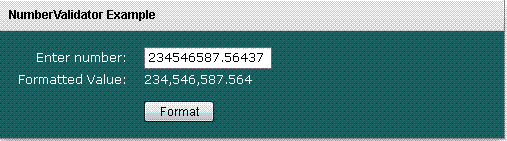
Running Application:
To view this page ensure that Adobe Flash Player version 10.0.0 or greater is installed.



