Filters in Flex4
Filters are used for effects not for style. You can use filters with MX and Spark components.
Filters are used for effects not for style. You can use filters with MX and Spark components.Filters in Flex4:
Filters are used for effects not for style. You can use
filters with MX and Spark components. You cannot apply them with style and
setStyle() method. The package of filters is spark.filters.* and mx.filters.*.
You will use filters in a <mx:filters> and <s:filters> tag. You can use any
number of filters in a <mx:filters> and <s:filters> tag.
There are so many filters like: DropShadowFilter, GlowFilter, BevelFilter and
BlurFilter etc. In this example you can see how we can use filters for making a
effect of components.
Example:
|
<?xml version="1.0" encoding="utf-8"?> <s:Application xmlns:fx="http://ns.adobe.com/mxml/2009"xmlns:s=" library://ns.adobe.com/flex/spark"xmlns:mx=" library://ns.adobe.com/flex/mx"minWidth=" 955" minHeight="600">fontSize=" 24" x="20" y="24"fontWeight=" bold"fontFamily=" verdana"color=" #D79E17">fontSize=" 24" x="20" y="136"fontWeight=" bold"fontFamily=" verdana"color=" #19389F"> <!-- This is BlurFilter --> <s:filters>fontSize=" 24" x="20" y="77"fontWeight=" bold"fontFamily=" verdana"color=" #777B12"> <!-- This is GlowFilter -->alpha=" 0.8"blurX=" 4" blurY="4"inner=" false"strength=" 10"quality=" 2"/> </s:filters> </s:Label>fontSize=" 24" x="20" y="187"fontWeight=" bold"fontFamily=" verdana"color=" #38D163"> <!-- This is BevelFilter -->highlightColor=" #FF0000"distance=" 6"shadowColor=" #808080"quality=" 4"/></s:Application> |
Output:
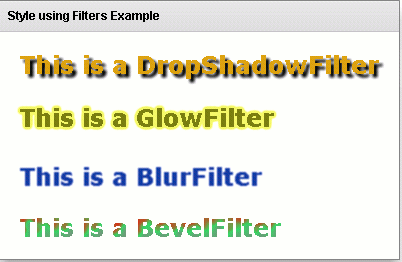
Running Application:
To view this page ensure that Adobe Flash Player version 10.0.0 or greater is installed.



