DropDownList in Flex4
The DropDownList control contains a drop-down list. You can select only one item at a time. Its functionality is very similar to that of the SELECT form element in HTML.
The DropDownList control contains a drop-down list. You can select only one item at a time. Its functionality is very similar to that of the SELECT form element in HTML.DropDownList control in Flex4:
The DropDownList control contains a drop-down list. You can select only
one item at a time. Its functionality is very similar to that of the SELECT
form element in HTML. The DropDownList control consists of three things: anchor
button, prompt area, and drop-down-list. You can provide the data to the
DropDownList
control by using the DataProvider(<s:dataprovider/>) Property. The DropDownList
control same as the ComboBox control.
The tag of DropDownList control is <s:DropDownList>.
Example:
|
<?xml version="1.0" encoding="utf-8"?> <s:Application xmlns:fx="http://ns.adobe.com/mxml/2009"xmlns:s=" library://ns.adobe.com/flex/spark"xmlns:mx=" library://ns.adobe.com/flex/mx"> <s:Panel title="DropDownLlist control" width="268" height="209" color="#990000"></s:Application> |
Output:
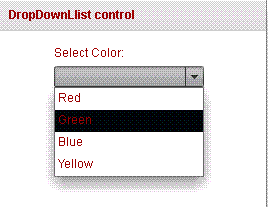
Running Application:
To view this page ensure that Adobe Flash Player version 10.0.0 or greater is installed.



