Drag and Drop between two list control in Flex4
In this example you can see how the data items of list are drag and drop from one list to another list.
In this example you can see how the data items of list are drag and drop from one list to another list.Drag and Drop between two list control in Flex4:
In this example you can see how the data items of list are drag and drop from one list to another list. Dragging and dropping is simple between two list control because the the component use the same data format.
Example:
|
<?xml version="1.0" encoding="utf-8"?> <s:Application xmlns:fx="http://ns.adobe.com/mxml/2009"xmlns:s=" library://ns.adobe.com/flex/spark"xmlns:mx=" library://ns.adobe.com/flex/mx"minWidth=" 955" minHeight="600"creationComplete="itemData();" > <fx:Script><![CDATA[ Item.dataProvider = buyItem.dataProvider = new ArrayList([]);} ]]> </fx:Script>chromeColor=" #555555"color=" #CCCCCC" width="311" height="225" backgroundColor="#93AE93">x=" 17" y="10"color=" #000000"fontFamily=" Verdana"/> <s:Label text="Choose item for buy"x=" 155" y="10"color=" #000000"fontFamily=" Verdana"/> <s:VGroup x="21" y="36" width="233" horizontalAlign="center">allowMultipleSelection=" true"dragEnabled=" true"dragMoveEnabled=" true"color=" #000000"height=" 120"contentBackgroundColor=" #FFFBCF"/> <s:Label text=">>" color="#000000"/>dropEnabled=" true"color=" #000000"contentBackgroundColor=" #FFFBCF"height=" 120"/> </s:HGroup>label=" Reset"click="itemData()" /></s:Application> |
Output:
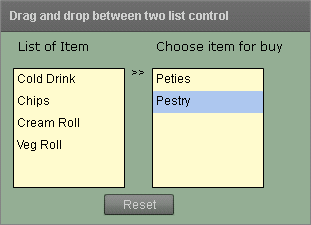
Running Application:
To view this page ensure that Adobe Flash Player version 10.0.0 or greater is installed.



