Flex ComboBox controls
In this tutorial we can illustrate how to create combo box in flex and What is the process to access the value of combo box in Flex
In this tutorial we can illustrate how to create combo box in flex and What is the process to access the value of combo box in FlexFlex ComboBox Control:-
The ComboBox control is a Data-Driven control in flex. ComboBox is a drop down list which we can display a list of value and user can select single value. It is similar to HTML select element.
In this tutorial you can see how to create ComboBox in flex and what is the procedure to access the value of Combo Box.
For Example:-
<?xml version="1.0" encoding="utf-8"?>
<mx:Application
xmlns:mx="http://www.adobe.com/2006/mxml" layout="vertical"><mx:Script>
<![CDATA[
import mx.events.DropdownEvent;Alert.show(
"Combobox Value :"+combovalve);}
private function openCombo(event:DropdownEvent):void{}
private function closeCombo(event:DropdownEvent):void{}
]]>
</mx:Script>
<mx:Panel width="250" height="200" horizontalAlign="center" verticalAlign="middle" title="Combo Box Panel"> <mx:HBox></mx:Application>
In this example you can see a combo box which is created by using <mx:ComboBox>tag. ComboBox value are provided through array collection which is display the month name in combo box. And you can see the property prompt is set. which is set when combobox is created. In this tutorial two event handler are set, one is openCombo<event> and other is closeCombo<event>. The event are pass in both event handler is DropDownEvent. The third event listener is comboboxvalue<event> which is any type of event, that show how to access the value of combo box in flex. Output of this example is,
Output:-
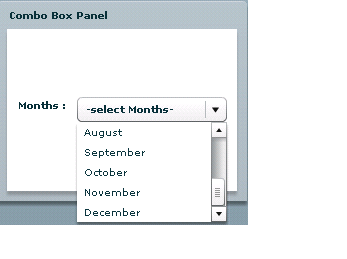
Combo box provide scroll Bar if the value of the combo box is greater then the width of the combo box.


