HSlider in Flex
In Adobe Flex HSlider Control, we can change the value by moving the slider thumb between the end points of the slider track. The current value is determined by the relative location of the thumb.
In Adobe Flex HSlider Control, we can change the value by moving the slider thumb between the end points of the slider track. The current value is determined by the relative location of the thumb.Adobe Flex HSlider Controls
In Adobe Flex HSlider Control we can change the value by moving the slider thumb between the end points of the slider track. The current value is determined by the relative location of the thumb.
In general the minimum value of a slider is 0 and the maximum value is 10. By configuring the control we can change values of HSlider, it could be continuous or discrete.
Adobe Flex Hslider Control Example 1:
<?xml version="1.0" encoding="utf-8"?>
<mx:Application
xmlns:mx="http://www.adobe.com/2006/mxml" layout="absolute"><mx:HSlider
labels="['min','max']" height="150"></mx:HSlider>
</mx:Application>
Output:

Example 2:
<?xml version="1.0" encoding="utf-8"?>
<mx:Application
xmlns:mx="http://www.adobe.com/2006/mxml" layout="absolute"><mx:HSlider
maximum="100" snapInterval="5" tickInterval="25" labels="[0,25,50,75,100]"></mx:HSlider>
</mx:Application>
Output:

Example 3:
<?xml version="1.0" encoding="utf-8"?>
<mx:Application
xmlns:mx="http://www.adobe.com/2006/mxml" layout="absolute"><mx:Script>
<![CDATA[
import mx.events.SliderEvent;textArea.text=(String)(currentValue.value);
}
]]>
</mx:Script>
<mx:VBox>
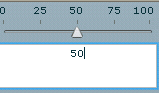
<mx:HSlider
maximum="100" snapInterval="5" tickInterval="25" labels="[0,25,50,75,100]" liveDragging="true" change="DisplayLiveChangeValue(event)"/><mx:TextArea
id="textArea"/></mx:VBox>
</mx:Application>
Output: