iBatis-Showing all data from database


iBatis is a Data persistence framework like Hibernate,
JDO and EJB
that maps objects to SQL statements. It is a lightweight framework and
persistence API good for persisting POJOs( Plain Old Java
Objects). iBatis is different from Hibernate,
JDO since it uses stored procedures and existing SQL to handle database.
In this tutorial we are going to tell you iBatis configuration for
a small application to run. As it is hard to explain everything in one go? so
we have presented this tutorial into few separate examples. This example is all
about to read data from the database and showing the results on your command
prompt. In the second example you will learn to add more data into the database
and after that third example is going to show you how to delete the data from
the records using iBatis.
Now in the first example that is going to show records from the database, we need a database to run queries, so we are using MySQL 5.0 as database for this example.
Here we are retrieving contact information of few persons. Table structure of "Contact" table is as given below:
Creating Database in MySQL
| DROP TABLE IF EXISTS `contact`; CREATE TABLE `contact` ( `id` int(11) NOT NULL auto_increment, `firstName` varchar(20) default NULL, `lastName` varchar(20) default NULL, `email` varchar(20) default NULL, PRIMARY KEY (`id`) ); |
According to this table "Contact" we have to make a POJO class. Our example database "vin" has a "Contact" table, which have four fields as:
- id
- firstName
- lastName
Contact.java
public class Contact { |
For mapping configuration we need to create "SqlMapConfig.xml" which specifies following things:
- Namespace prefix for referring mapped statements.
- Our database will be accessed using JDBC
- JDBC driver for MySQL is "com.mysql.jdbc.Driver"
- Connection URL is "jdbc:mysql://192.168.10.112:3306/vin"
- username and password is "root" and "root"
- Our sql statement mappings are described in "Contact.xml"
SqlMapConfig.xml
| <?xml version="1.0"
encoding="UTF-8"?> <!DOCTYPE sqlMapConfig PUBLIC "-//ibatis.apache.org//DTD SQL Map Config 2.0//EN" "http://ibatis.apache.org/dtd/sql-map-config-2.dtd"> <sqlMapConfig> <settings useStatementNamespaces="true"/> <transactionManager type="JDBC"> <dataSource type="SIMPLE"> <property name="JDBC.Driver" value="com.mysql.jdbc.Driver"/> <property name="JDBC.ConnectionURL" value="jdbc:mysql://192.168.10.112:3306/vin"/> <property name="JDBC.Username" value="root"/> <property name="JDBC.Password" value="root"/> </dataSource> </transactionManager> <sqlMap resource="Contact.xml"/> </sqlMapConfig> |
Mapping file "Contact.xml" is given as follows which is responsible for our application to execute SQL queries. Full code of Contact.xml is as follows:
Contact.xml
| <?xml version="1.0"
encoding="UTF-8"?> <!DOCTYPE sqlMap PUBLIC "-//ibatis.apache.org//DTD SQL Map 2.0//EN" "http://ibatis.apache.org/dtd/sql-map-2.dtd"> <sqlMap namespace="Contact"> <!--- Showing all data of table --> <select id="getAll" resultClass="Contact"> select * from contact </select> </sqlMap> |
Now to show data from database we have created a class "IbatisExample", which reads configuration from SqlMapConfig.xml and then show all data on your console output. Full source code of IbatisExample.java is as follows:
IbatisExample.java
|
To run this example you have to follow these steps :
- Create table Contact in your MySQL database
- Download jar file of iBatis(ibatis-common-2.jar,ibatis-dao-2.jar,ibatis-sqlmap-2.jar) and put it to your lib directory
- Set class path
- Create and save Contact.java and compile it
- Create and save Contact.xml
- now create SqlMapConfig.xml file and finally
- create IbatisExample.java and compile it
- Execute IbatisExample file
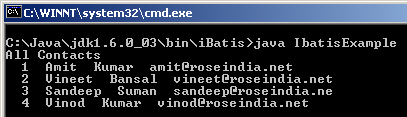
Output:
Output on your command prompt would be like as follows.