Simple input application in Echo3


In this sample server-side application we have created
an application which contains the window from where the user can input a
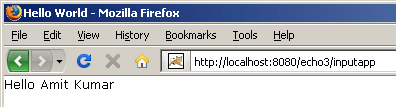
text and this value would be shown into the content pane when user will click on
the "Ok" button.
For creating this sample application we have created
two java files InputTextServlet.java and InputTextApp.java.
InputTextApp class extends an abstract class ApplicationInstance and
represents the state of user interface. Each and every user who will invoke the
application would contain its own unique instance. The init() method is used to
initialize the state of the user interface for a new user. It should return an
Window object representing the state of the initial window of an application. InputTextServlet
extends the WebContainerServlet and it is responsible for invoking a
new application instance which will return a new application instance for the InputTextApp.
InputTextServlet.java
package inputText;


import nextapp.echo.app.ApplicationInstance;

import nextapp.echo.webcontainer.WebContainerServlet;


public class InputTextServlet extends WebContainerServlet {


  public ApplicationInstance newApplicationInstance() {

  return new InputTextApp();

  }

}
|
InputTextApp.java
package inputText;


import nextapp.echo.app.ApplicationInstance;

import nextapp.echo.app.ContentPane;

import nextapp.echo.app.Label;

import nextapp.echo.app.Window;

import nextapp.echo.app.*;


import nextapp.echo.app.event.ActionListener;

import nextapp.echo.app.event.ActionEvent;


public class InputTextApp extends ApplicationInstance {


 private String input;

 private Label  welcomeLabel;

 private TextField nameField;

 private WindowPane windowPane;


  private static final Extent PX_200 = new Extent(200, Extent.PX);

 public Window init() {

  Window window = new Window();

  window.setTitle("Hello World");

  ContentPane contentPane = new ContentPane();

  Label label=new Label("Enter name:");

  windowPane = new WindowPane(

      WindowPane.PROPERTY_MINIMIZE_ICON ,PX_200,PX_200);

  windowPane.setTitle("Hello World!");

  Grid grid=new Grid(4);

  grid.setBackground(new Color(0xff,0xff,0xdd));

  Button ok = new Button("OK");

  ok.setActionCommand("submit name");


    ok.addActionListener(new ActionListener() {

  public void actionPerformed(ActionEvent e) {

  input = nameField.getText();

  welcomeLabel.setText("Hello "+input);

  windowPane.userClose();

 }

  });

  nameField = new TextField();

  Button clear = new Button("clear");

  clear.setActionCommand("clear name");

  clear.addActionListener(new ActionListener() {

  public void actionPerformed(ActionEvent e) {

  nameField.setText("");

  }

  });

  windowPane.add(grid);

  grid.add(label);

  grid.add(nameField);

  grid.add(ok);

  grid.add(clear);

  welcomeLabel = new Label();

  contentPane.add(welcomeLabel);

 contentPane.add(windowPane);

  window.setContent(contentPane);

  return window;

  }

}
|
To run this sample application create and save
InputTextServlet.java and InputTextApp.java and compile them. Place
these class files into the /WEB-INF/classes folder.
Do the servlet entry and servlet mapping into the
deployment descriptor web.xml .
web.xml
<!DOCTYPE web-app
PUBLIC "-//Sun Microsystems, Inc.//DTD Web Application 2.3//EN"
"http://java.sun.com/dtd/web-app_2_3.dtd">
<web-app>
<display-name>Interactive Test Application</display-name>
<description>
An interactive application to test features of the Echo Platform.
</description>
<servlet>
<servlet-name>InputTextServlet</servlet-name>
<servlet-class>inputText.InputTextServlet</servlet-class>
</servlet>
<servlet-mapping>
<servlet-name>InputTextServlet</servlet-name>
<url-pattern>/inputapp</url-pattern>
</servlet-mapping>
</web-app> |
Output:


Download Project Source Code

