Spring 3 MVC and Hibernate 3 Example Part 3
This tutorial explains how to use annotations with spring 3 MVC and hibernate 3 based application to make the development easier and faster than ever before.
This tutorial explains how to use annotations with spring 3 MVC and hibernate 3 based application to make the development easier and faster than ever before.
ArticleService.java
This is the interface which declares methods which will be used in controller
class.
package net.roseindia.service;


import java.util.List;


import net.roseindia.model.Article;


public interface ArticleService {


  public void addArticle(Article article);


  public List<Article> listArticles();

}
|
ArticleServiceImpl.java
This is the implementation class of ArticleService Interface. It defines all
the methods declared in ArticleService interface. These methods uses Dao classes
to interact with the database.
@Service("articleService") annotation is used to declare it
as service bean and its name articleService will be used to auto wire its
instance in controller class.
@Transactional annotation is used to declare the method
transactional. You can also use this at the class level to declare all methods
transactional.
package net.roseindia.service;


import java.util.List;


import net.roseindia.dao.ArticleDao;

import net.roseindia.model.Article;


import org.springframework.beans.factory.annotation.Autowired;

import org.springframework.stereotype.Service;

import org.springframework.transaction.annotation.Propagation;

import org.springframework.transaction.annotation.Transactional;


@Service("articleService")

@Transactional(propagation = Propagation.SUPPORTS, readOnly = true)

public class ArticleServiceImpl implements ArticleService {


  @Autowired

  private ArticleDao articleDao;


  public ArticleServiceImpl() {

  }


  @Transactional(propagation = Propagation.REQUIRED, readOnly = false)

  public void addArticle(Article article) {

    articleDao.saveArticle(article);

  }


  public List<Article> listArticles() {

    return articleDao.listArticles();

  }


}
|
ArticleController.java
This is the spring controller class which handles the request, processes it
and returns back to the client.
@Controller annotation declares this as a controller class.
@RequestMapping("/articles") annotation tells Spring to
process all requests beginning with /articles.
@RequestMapping(method = RequestMethod.GET) annotation tells
Spring to process the request url /articles.html.
package net.roseindia.controller;


import java.util.HashMap;

import java.util.Map;


import net.roseindia.model.Article;

import net.roseindia.service.ArticleService;


import org.springframework.beans.factory.annotation.Autowired;

import org.springframework.stereotype.Controller;

import org.springframework.validation.BindingResult;

import org.springframework.web.bind.annotation.ModelAttribute;

import org.springframework.web.bind.annotation.RequestMapping;

import org.springframework.web.bind.annotation.RequestMethod;

import org.springframework.web.servlet.ModelAndView;


@Controller

@RequestMapping("/articles")

public class ArticleController {


  @Autowired

  private ArticleService articleService;


  @RequestMapping(value = "/save", method = RequestMethod.POST)

  public ModelAndView saveArticle(@ModelAttribute(" article") Article  article,

      BindingResult result) {

     articleService.addArticle( article);

    return new ModelAndView("redirect:/articles.html");

  }


  @RequestMapping(method = RequestMethod.GET)

  public ModelAndView listArticles() {

    Map<String, Object> model = new HashMap<String, Object>();

    model.put("articles",  articleService.listArticles());


    return new ModelAndView("articlesList", model);

  }


  @RequestMapping(value = "/add", method = RequestMethod.GET)

  public ModelAndView addArticle(@ModelAttribute("article") Article article,

      BindingResult result) {

    return new ModelAndView("addArticle");

  }


}
|
articlesList.jsp
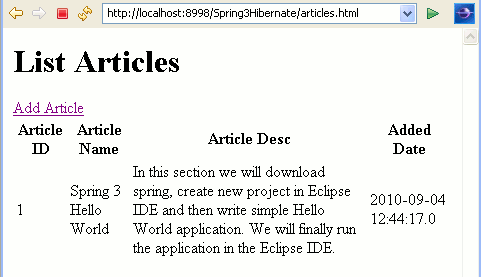
This jsp file is called when /articles.html is requested.
|
<%@
taglib
uri="http://java.sun.com/jsp/jstl/core"
prefix="c"%>
< html>
< head>
< title>All
Articles</title>
</ head>
< body>
< h1>List
Articles</h1>
< a
href="articles/add.html">Add
Article</a>
< c:if
test="${!empty
articles}">
<table>
<tr>
<th>Article
ID</th>
<th>Article
Name</th>
<th>Article
Desc</th>
<th>Added
Date</th>
</tr>
<c:forEach
items="${articles}"
var="article"> 0
<tr>
<td><c:out
value="${article.articleId}"/></td>
<td><c:out
value="${article.articleName}"/></td> 1
<td><c:out
value="${article.articleDesc}"/></td>
<td><c:out
value="${article.addedDate}"/></td>
</tr> 2
</c:forEach>
</table>
</ c:if> 3
</ body>
</ html>
|
addArticle.jsp
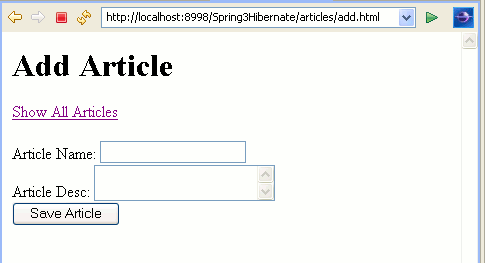
This jsp file is called when
articles/add.html is
requested.
|
<%@
taglib
uri="http://java.sun.com/jsp/jstl/core"
prefix="c"%> 4
<%@
taglib
uri="http://www.springframework.org/tags/form"
prefix="form"%>
< html>
< head><title>Add
Article</title></head> 5
< body>
< h1>Add
Article</h1>
< c:url
var="viewArticlesUrl"
value="/articles.html"
/> 6
< a
href="${viewArticlesUrl}">Show
All Articles</a>
< br
/>
< br
/> 7
< c:url
var="saveArticleUrl"
value="/articles/save.html"
/>
< form:form
modelAttribute="article"
method="POST"
action="${saveArticleUrl}">
<form:label
path="articleName">Article
Name:</form:label> 8
<form:input
path="articleName"
/>
<br
/>
<form:label
path="articleDesc">Article
Desc:</form:label> 9
<form:textarea
path="articleDesc"
/>
<br
/>
<input
type="submit"
value="Save
Article"
/> 0
</ form:form>
</ body>
</ html> 1
|
index.jsp
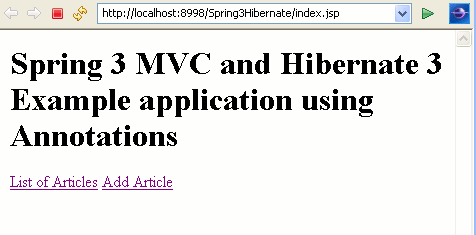
This is the index page which is called by default for application.
|
<%@
page
language="java"
contentType="text/html;
charset=ISO-8859-1"
pageEncoding="ISO-8859-1"%>
<! DOCTYPE
html
PUBLIC
"-//W3C//DTD HTML 4.01 Transitional//EN"
"http://www.w3.org/TR/html4/loose.dtd">
< html> 2
<head>
<meta
http-equiv="Content-Type"
content="text/html;
charset=ISO-8859-1">
<title>Spring
3 MVC and Hibernate 3 Example application using Annotations</title> 3
</head>
<body>
<h1>Spring
3 MVC and Hibernate 3 Example application using Annotations</h1> 4
<a
href="articles.html">List
of Articles</a>
<a
href="articles/add.html">Add
Article</a>
</body> 5
</ html>
|
When we compile the application and run, it displays the output as below:
6
Click on List of Articles link. It displays all articles as below:
Click on Add Article link, it let you add article in database.
7
Download the application


