Spring NamedParameterJdbcTemplate example
This section contains the NamedParameterJdbcTemplate description with an example.
This section contains the NamedParameterJdbcTemplate description with an example.Spring NamedParameterJdbcTemplate example
The NamedParameterJdbcTemplate provide better approach than JdbcTemplate ,where multiple parameters are in use for an SQL statement. It eliminated need of traditional JDBC "?" and provide named parameters. It is easy to use and provide better documentation. It functionality is similar to JdbcTemplate except it incorporate named parameters instead of "?" placeholder.
EXAMPLE
NPJTemplate.java
package net.roseindia;

import javax.sql.DataSource;
import org.springframework.jdbc.core.namedparam.NamedParameterJdbcTemplate;
import org.springframework.jdbc.core.namedparam.MapSqlParameterSource;
import org.springframework.jdbc.core.namedparam.SqlParameterSource;

public class NPJTemplate {

	private NamedParameterJdbcTemplate namedParameterJdbcTemplate;

	public void setDataSource(DataSource dataSource) {
		this.namedParameterJdbcTemplate = new NamedParameterJdbcTemplate(
				dataSource);
	}

	public int CountStundentBranch(String Branch) {
	String sql = "select count(*) from studentrecord where branch = :branch";
	SqlParameterSource namedParameters = new MapSqlParameterSource(
				"branch", Branch);
	return namedParameterJdbcTemplate.queryForInt(sql, namedParameters);
	}
}
NPJTemplateMain.java
package net.roseindia;

import org.springframework.beans.factory.xml.XmlBeanFactory;
import org.springframework.core.io.ClassPathResource;

public class NPJTemplateMain {
    public static void main(String[] args) {

    XmlBeanFactory beanFactory = new XmlBeanFactory(new ClassPathResource(
			"NPJTemplate.xml"));

    NPJTemplate myBean = (NPJTemplate) beanFactory.getBean("NPJT");

    System.out.println("NUMBER OF STUDENT IN PROVIDED BRANCH :"
			+ myBean.CountStundentBranch("Information Technology"));

	}
}
NPJTemplate.xml
<?xml version="1.0" encoding="UTF-8"?>

<beans xmlns="http://www.springframework.org/schema/beans"

xmlns:xsi="http://www.w3.org/2001/XMLSchema-instance" xmlns:context="http://www.springframework.org/schema/context"

xsi:schemaLocation="

http://www.springframework.org/schema/beans

http://www.springframework.org/schema/beans/spring-beans-3.0.xsd

http://www.springframework.org/schema/context

http://www.springframework.org/schema/context/spring-context-3.0.xsd">

<bean id="NPJT" class="net.roseindia.NPJTemplate">

<property name="dataSource" ref="dataSource" />

</bean>

<bean id="designationDAO" class="net.roseindia.DesignationQuery">

<property name="dataSource" ref="dataSource" />

</bean>

<bean id="dataSource" class="com.mchange.v2.c3p0.ComboPooledDataSource"

destroy-method="close">

<property name="driverClass" value="com.mysql.jdbc.Driver" />

<property name="jdbcUrl" value="jdbc:mysql://192.168.10.13:3306/ankdb" />

<property name="user" value="root" />

<property name="password" value="root" />

</bean>

</beans>
Description of the program :
For using NamedParameterJdbcTemplate ,you need to import following classes :
1.org.springframework.jdbc.core.namedparam.NamedParameterJdbcTemplate .
2.org.springframework.jdbc.core.namedparam.MapSqlParameterSource .
3.org.springframework.jdbc.core.namedparam.SqlParameterSource .
Take a look on the following code to understand the working of NamedParameterJdbcTemplate :
1.public int CountStundentBranch(String Branch) {
2.   String sql = "select count(*) from studentrecord where branch = :branch";
3.   SqlParameterSource namedParameters = new MapSqlParameterSource(
	 "branch", Branch);
4.  return namedParameterJdbcTemplate.queryForInt(sql, namedParameters);
5. }
In query , we are using named parameter instead of "?" placeholder. The SqlParameterSource object is used to map the value passed by the function to named parameter. In this case name parameter is "branch" and passed value is stored in "Branch" .After this namedParameterJdbcTemplate pass the query and SqlparameterSource object to execute it.
OUTPUT
The database table :

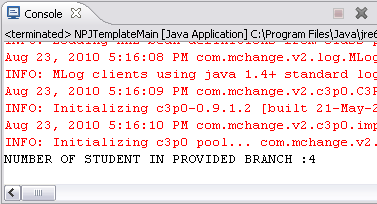
After executing code eclipse console :