Zend FrameWork Part-11
This is the eleventh and second last installment of the ZF Tutorial series. In this tutorial we will study how to edit any data, subsequent page will discuss on delete section of ZF.
This is the eleventh and second last installment of the ZF Tutorial series. In this tutorial we will study how to edit any data, subsequent page will discuss on delete section of ZF.Zend Framework-11:
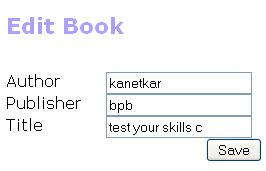
Edit Book:
Editing a book and its content is identical to the adding. With the help of following coding we can edit the necessary changes. After every entry there is a link called edit which proceeds us to another page which is made for editing any record. In the edit page there will be three text boxes in which the records will be shown and we can make necessary changes in those records, after making changes click the save button and it will take us to the index page again and we can see the updated page.
Copy and paste the following coding in editAction() method.
/application/controllers/IndexController.php
.....
public function editAction()
{
$this->view->title = "Edit Book";
$this->view->headTitle($this->view->title);
$form = new Application_Form_Book();
$form->submit->setLabel('Save');
$this->view->form = $form;
if ($this->getRequest()->isPost()) {
$formData = $this->getRequest()->getPost();
if ($form->isValid($formData)) {
$id = (int)$form->getValue('id');
$author = $form->getValue('author');
$publisher = $form->getValue('publisher');
$title = $form->getValue('title');
$books = new Application_Model_DbTable_Books();
$books->updateBook($id, $author,$publisher,$title);
$this->_helper->redirector('index');
} else {
$form->populate($formData);
}
} else {
$id = $this->_getParam('id', 0);
if ($id > 0) {
$books = new Application_Model_DbTable_Books();
$form->populate($books->getBook($id));
}
}
}
.....
../application/views/scripts/index/edit.phtml
<?php echo $this->form;?>
Output: