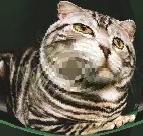
PHP GD Punch
This example shows how to display punch in php gd.
This example shows how to display punch in php gd.
<?php
$image =
imagecreatefromjpeg("images.jpg");
$displacement =
displacement($image);
$image =
imagedisplace($image,$displacement);
header(
"Content-type:
image/jpeg");
imagejpeg(
$image);
imagedestroy(
$image);
function displacement($i)
{
$width =
imagesx($i);
$height =
imagesy($i);
for ($y=0;$y<$height;$y++)
{
for ($x=0;$x<$width;$x++)
{
$pos_x =
$x - ($width/2);
$pos_y =
$y - ($height/2);
$theta =
atan2(($pos_y),($pos_x));
$radius =
sqrt($pos_x*$pos_x
+ $pos_y*$pos_y);
$newRadius =
$radius * $radius/(max(($width/2),
($height/2)));
$newX =
($width/2)
+ ($newRadius * cos($theta));
if ($newX
> 0 &&
$newX < $width)
{
$dis_x =
$newX;
}
else {
$dis_x =
0;
}
$newY =
($height/2)
+ ($newRadius * sin($theta));
if ($newY
> 0 &&
$newY < $height)
{
$dis_y =
$newY;
}
else {
$dis_y =
0;
}
$dis_x =
($dis_x < 0)
? $dis_x + $width
: $dis_x;
0
$dis_x =
($dis_x >= $width)
? $dis_x - $width
: $dis_x;
$dis_y =
($dis_y < 0)
? $dis_y + $height
: $dis_y;
$dis_y =
($dis_y >= $height)
? $dis_y - $height
: $dis_y;
1
$displacement['x'][$x][$y]
= $dis_x;
$displacement['y'][$x][$y]
= $dis_y;
}
2
}
return $displacement;
}
3
function imagedisplace($i,$displacement)
{
$width =
imagesx($i);
$height =
imagesy($i);
4
$temp =
imagecreatetruecolor($width,$height);
imagecopy(
$temp,$i,0,0,0,0,$width,$height);
for ($y=0;$y<$height;$y++)
{
5
for ($x=0;$x<$width;$x++)
{
$rgb =
imagecolorat($temp,$displacement['x'][$x][$y],$displacement['y'][$x][$y]);
$a =
($rgb >> 24)
& 0xFF;
6
$r =
($rgb >> 16)
& 0xFF;
$g =
($rgb >> 8)
& 0xFF;
$b =
$rgb & 0xFF;
7
$col =
imagecolorallocatealpha($i,$r,$g,$b,$a);
imagesetpixel(
$i,$x,$y,$col);
}
8
}
imagedestroy(
$temp);
return $i;
9
}
?>
After running the program you will get the following output