PHP GD alpha
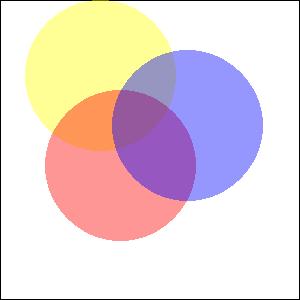
This example shows how to display images with the help of function imagecolorallocatealpha()in php gd.
This example shows how to display images with the help of function imagecolorallocatealpha()in php gd.<?php
$size
= 300;$image
=imagecreatetruecolor($size, $size);$back
= imagecolorallocate($image, 255, 255, 255);$border
= imagecolorallocate($image, 0, 0, 0);imagefilledrectangle(
$image, 0, 0, $size - 1, $size - 1, $back);imagerectangle(
$image, 0, 0, $size - 1, $size - 1, $border);$yellow_x
= 100;$yellow_y
= 75;$red_x
= 120;$red_y
= 165;$blue_x
= 187;$blue_y
= 125;$radius
= 150;$yellow
= imagecolorallocatealpha($image, 255, 255, 0, 75);$red
= imagecolorallocatealpha($image, 255, 0, 0, 75);$blue
= imagecolorallocatealpha($image, 0, 0, 255, 75);imagefilledellipse(
$image, $yellow_x, $yellow_y, $radius, $radius, $yellow);imagefilledellipse(
$image, $red_x, $red_y, $radius, $radius, $red);imagefilledellipse(
$image, $blue_x, $blue_y, $radius, $radius, $blue);header(
'Content-type: image/jpeg');imagejpeg(
$image);imagedestroy(
$image);?>
After running the program you will get the following output