PHP Control Statement
PHP Conditional statements helps us to perform different actions for different decisions. You can use conditional statements to control the flow of the program according to the requirement of the program.
PHP Conditional statements helps us to perform different actions for different decisions. You can use conditional statements to control the flow of the program according to the requirement of the program.PHP Control Statement
The PHP Conditional statements helps us to perform different actions for different decisions. You can use conditional statements to control the flow of the program according to the requirement of the program.
In the current tutorial - we'll study two control statements: If..else and switch case.
Example:
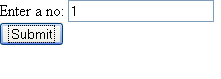
php-control-stmt.html
<!DOCTYPE html PUBLIC "-//W3C//DTD HTML 4.01 Transitional//EN" "http://www.w3.org/TR/html4/loose.dtd">
<html>
<head>
<meta http-equiv="Content-Type" content="text/html; charset=ISO-8859-1">
<title>Insert title here</title>
</head>
<body>
<form action="php-control-stmt.php" method="get">
Enter a no: <input type="text" name="num"/>
<Br/>
<input type="submit" Value="Submit"/>
</form>
</body>
</html>
php-control-stmt.php
<?php
$i=$_GET['num'];
if($i>0)
echo "Positive";
else if ($i<0)
echo "Negative";
else
echo "Zero";
echo "<br/><b>Using Switch case:</b><br/>";
switch($i)
{
case 0:
echo "Zero";
break;
case 1:
echo "One";
break;
case 2:
echo "Two";
break;
default:
echo "other";
}
Output:
Positive
Using Switch case:
One


