Php Sql Query Insert
This example illustrates how to execute insert query with values in php application.
This example illustrates how to execute insert query with values in php application.Php Sql Query Insert
This example illustrates how to execute insert query with values in php application.
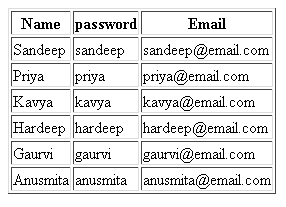
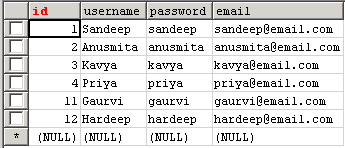
In this example we create two mysql query for insert statement with separate values in the database table. The table before insertion and after insertion is as follows and the complete source code given below with output.
Table: users before insertion
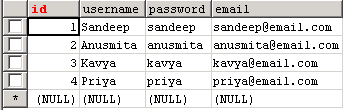
Table: users after insertion
Source Code of insertquery.php
|
<?php $con = mysql_connect("localhost","root","root"); if (!$con) { die('Could not connect: ' . mysql_error()); } mysql_select_db("test", $con); mysql_query("INSERT INTO users (username, password, email) VALUES ('Gaurvi', 'gaurvi', '[email protected]')"); mysql_query("INSERT INTO users (username, password, email) VALUES ('Hardeep', 'hardeep', '[email protected]')"); $result = mysql_query("SELECT * FROM users ORDER BY username desc"); echo "<table border='1'> <tr> <th>Name</th> <th>password</th> <th>Email</th> </tr>"; while ($row = mysql_fetch_array($result)) { echo "<tr>"; echo "<td>" . $row['username'] . "</td>"; echo "<td>" . $row['password'] . "</td>"; echo "<td>" . $row['email'] . "</td>"; echo "</tr>"; } echo "</table>"; mysql_close($con); ?> |
Output: