jQuery Simple Drop Down Menu
In this section, you will learn how to develop a simple drop down menu using jQuery
In this section, you will learn how to develop a simple drop down menu using jQueryjQuery Simple Drop Down Menu
In this section, you will learn how to develop a simple drop down menu using jQuery. To develop a drop down menu we put the menu items in a unordered list .After that we design and manage it using CSS . After it we bind the two events i.e. mouseover & mouseout to two user defined functions i.e. "jsddm_open" & "jsddm_timer" . The other two functions are helping function of the previously describe functions. The complete code is given below :
DropDownMenu.html
| <!DOCTYPE html PUBLIC "-//W3C//DTD XHTML 1.0 Strict//EN" "http://www.w3.org/TR/xhtml1/DTD/xhtml1-strict.dtd"> <html> <head> <title>jQuery Simple Drop Down Menu</title> <meta name="keywords" content="" /> <meta name="description" content="" /> <style type="text/css"> /* common page styles */ body { background: #6595A3; padding: 0 20px} .clear { clear: both; overflow: hidden; height: 0} #all { width: 60%; min-width: 650px; margin: 40px auto 0 auto; background: #FCFFED; padding: 20px 35px} h1 { font: 26px tahoma, arial; color: #324143} p { font: 12px tahoma, arial; color: #171F26; margin-bottom: 25px} a { color: #324143} </style> </head> <body> <div id="all"> <style type="text/css"> /* menu styles */ #jsddm { margin: 0; padding: 0} #jsddm li { float: left; list-style: none; font: 12px Tahoma, Arial} #jsddm li a { display: block; background: #324143; padding: 5px 12px; text-decoration: none; border-right: 1px solid white; width: 70px; color: #FF6347; white-space: nowrap} #jsddm li a:hover { background: #24313C} #jsddm li ul { margin: 0; padding: 0; position: absolute; visibility: hidden; border-top: 1px solid white} #jsddm li ul li { float: none; display: inline} #jsddm li ul li a { width: auto; background: #FF6347; color: #24313C} #jsddm li ul li a:hover { background: #6495ED} </style> <script src="jquery-1.4.2.js" type="text/javascript"></script> <script type="text/javascript"> var timeout = 500; var closetimer = 0; var ddmenuitem = 0; function jsddm_open() { jsddm_canceltimer(); jsddm_close(); ddmenuitem = $(this).find('ul').eq(0).css('visibility', 'visible');} function jsddm_close() { if(ddmenuitem) ddmenuitem.css('visibility', 'hidden');} function jsddm_timer() { closetimer = window.setTimeout(jsddm_close, timeout);} function jsddm_canceltimer() { if(closetimer) { window.clearTimeout(closetimer); closetimer = null;}} $(document).ready(function() { $('#jsddm > li').bind('mouseover', jsddm_open); $('#jsddm > li').bind('mouseout', jsddm_timer);}); document.onclick = jsddm_close; </script> <center><h3><font color="green"> Hover mouse on any menu item to drop down list</font></h3></center> <ul id="jsddm"> <li><a href="#">Ajax</a> <ul> <li><a href="#">Global Ajax Event Handler</a></li> <li><a href="#">Low Level InterFace</a></li> <li><a href="#">Short Hand Methods</a></li> </ul> </li> <li><a href="#">Effects</a> <ul> <li><a href="#">Basic</a></li> <li><a href="#">Custom</a></li> <li><a href="#">Sliding</a></li> <li><a href="#">Fading</a></li> <li><a href="#">Semitransparent</a></li> </ul> </li> <li><a href="#">Events</a></li> <li><a href="#">Forms</a></li> <li><a href="#">Plug-ins</a></li> </ul> </div> </body> </html> |
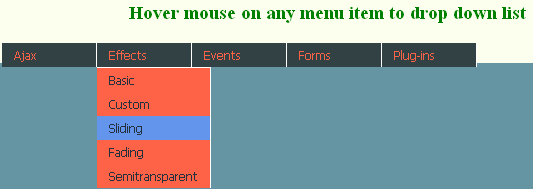
OUTPUT
When you hover on any menu list :