Home Tutorial Javascript JavaScript validation for decimal number


JavaScript validation for decimal number
Posted on: August 12, 2010 at 12:00 AM
Here we are going to validate the text field value.

JavaScript validation for decimal number

Here we are going to validate the text field value. For this, we have allowed the user to enter decimal number in the textbox, the javascript takes the value of textbox and check it. If it contains the decimal sign (.) and it is a number then it will be declared as valid otherwise invalid.

Here is the code:

<script type="text/javascript" language="javascript">
function
isDecimal(str){
if(isNaN(str) || str.indexOf(".")<0){
alert("Invalid");
}
else{
str=parseFloat(str);
alert ("Entered number is decimal")
}
}

function validate(){
var
dec=document.form.num.value;
if (dec == ""){
alert("Please enter.");
form.num.focus();
return false;
}
if (isDecimal(dec)==false){
num="";
form.num.focus();
return false;
}
return true;
}
</script>
<
form name="form" method="post" onsubmit="return validate();">
Enter Decimal Number:<input type="text" name="num"> <input
type="submit" value="Check">
</
form>

Output:

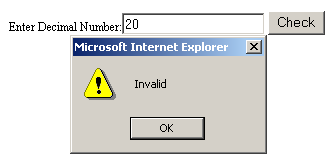
If you will enter any text or a number, it will display error message:
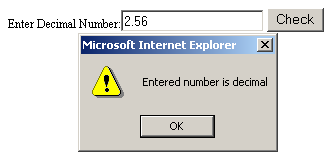
If you will enter decimal number, it will display success message:
Related Tags for JavaScript validation for decimal number:


Ask Questions?

If you are facing any programming issue, such as compilation errors or not able to find the code you are looking for.

Ask your questions, our development team will try to give answers to your questions.
