Home Tutorial Java Dbcp Delete all rows using DBCP


Delete all rows using DBCP
Posted on: April 5, 2010 at 12:00 AM
This tutorial demonstrate how to delete all record from the table using DBCP.

Code:

import java.sql.*;
import org.apache.commons.dbcp.BasicDataSource;

public class DeleteAllRows {
  public static void main(String[] args) {
    BasicDataSource bds = new BasicDataSource();
    bds.setDriverClassName("com.mysql.jdbc.Driver");
    bds.setUrl("jdbc:mysql://localhost:3306/mydb");
    bds.setUsername("root");
    bds.setPassword("");
    try {
      Connection con = bds.getConnection();
      Statement st = con.createStatement();
      st.executeUpdate("DELETE FROM  emp");
      System.out.println("All Record Deleted!!!");
      con.close();
    catch (Exception e) {
      e.printStackTrace();
    }
  }
}

Directory structure of files:

In the lib folder place all required jar files ie. commons-collections.jar, commons-dbcp.jar, commons-pool.jar, j2ee.jar and mysql-connector-java-5.1.7-bin.jar

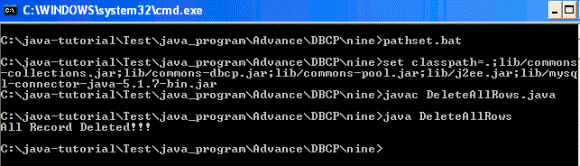
In the pathset.bat write following statement

set classpath=.;lib/commons-collections.jar;lib/commons-dbcp.jar;lib/commons-pool.jar;lib/j2ee.jar;lib/mysql-connector-java-5.1.7-bin.jar

Output:
Related Tags for Delete all rows using DBCP:


Ask Questions?

If you are facing any programming issue, such as compilation errors or not able to find the code you are looking for.

Ask your questions, our development team will try to give answers to your questions.