Alert View with two Buttons
In this tutorial we are going to show alert view, this is shown only when the text field on the view is not entered.
In this tutorial we are going to show alert view, this is shown only when the text field on the view is not entered.
Alert View with two Buttons
Project will look like this :
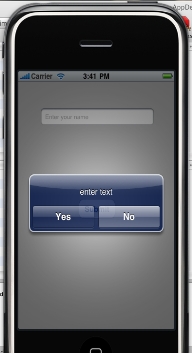
In this tutorial we are going to show alert view, this is shown only when the text field on the view is not entered.
My project name is UIAlertView,is based on View application so it will have two .h and two .m file i.e. UIAlertViewAppDelegate.h, UIAlertViewAppDelegate.m,UIAlertViewViewController.h and UIAlertViewViewController.m files.
In this to enter a text field into the view we require text field so we declaring the text field as outlet and there is action for the alert view and in .xib file add text field from the library and round button.
UIAlertViewViewController.h file will look like this:
#import <UIKit/UIKit.h>
@interface UIAlertViewViewController : UIViewController
{
IBOutlet UITextField *textField;
}
- (IBAction)showAlertBox:(id)sender;
@end
In .m file we are writing the method for the action
- (IBAction)showAlertBox:(id)sender
{
if([textField.text length]==0)
{
UIAlertView * alert = [[UIAlertView alloc] initWithTitle:@""
message:@"enter text"
delegate:self
cancelButtonTitle:@"Yes"
otherButtonTitles:@"No", nil];
[alert show];
}
[textField resignFirstResponder];
}
UIAlertViewViewController.m file will look like this:
#import "UIAlertViewViewController.h"
@implementation UIAlertViewViewController
- (IBAction)showAlertBox:(id)sender
{
if([textField.text length]==0)
{
UIAlertView * alert = [[UIAlertView alloc] initWithTitle:@""
message:@"enter text"
delegate:self
cancelButtonTitle:@"Yes"
otherButtonTitles:@"No", nil];
[alert show];
}
[textField resignFirstResponder];
}
- (void)didReceiveMemoryWarning
{
[super didReceiveMemoryWarning];
}
- (void)viewDidUnload
{
// Release any retained subviews of the main view.
// e.g. self.myOutlet = nil;
}
- (void)dealloc
{
[super dealloc];
}
@end
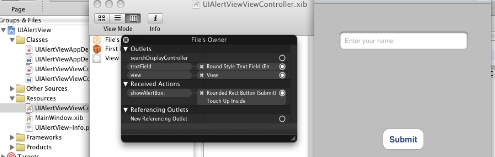
Make appropriate connection in Interface Builder as shown
Press Build And Go Button


