HTML 5 caption Tag, Definition of <caption>tag in html5
In this discussion we will introduce about the use of <caption> tag in html5.
In this discussion we will introduce about the use of <caption> tag in html5.HTML 5 <caption> Tag, Definition of <caption> tag in html5
In this discussion we will introduce about the use of <caption> tag in html5. This tag is used to create the caption of the table. The <caption> tag defines the title of the table and used just after the <table> tag. The <caption> tag is used only once for a <table> tag. The caption by default apears centered and above the table. There is no specific attribute of this tag and "align" attribute is not supported in html5.
Declaration Syntax:
| <caption>Caption For Table</caption> |
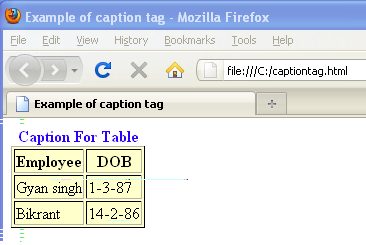
Example:captiontag.html
| <!DOCTYPE html> <html> <head> <title>Example of caption tag</title> </head> <body> <table border="1" bgcolor="#FFFFCC"> <caption><font color="#2a00ff"> <b>Caption For Table</b></font></caption> <tr> <th>Employee</th> <th>DOB</th> </tr> <tr> <td>Gyan singh</td> <td>1-3-87</td> </tr> <tr> <td>Bikrant</td> <td>14-2-86</td> </tr> </table> </body> </html> |
Output:
Difference between HTML5 and HTML4
There is no difference in both the versions in declaration.


