ZipCodeValidator in Flex4
The ZipCodeValidator class validates the correct length of the numeric value.
The ZipCodeValidator class validates the correct length of the numeric value.ZipCodeValidator in Flex4:
The ZipCodeValidator class validates the correct length
of the numeric value.
It checks the length for a five-digit ZIP code, a five-digit+four-digit United
States ZIP code.
The tag of ZipCodeValidator is <mx:ZipCodeValidator>.
Example:
|
<?xml version="1.0" encoding="utf-8"?> <s:Application xmlns:fx="http://ns.adobe.com/mxml/2009"xmlns:s=" library://ns.adobe.com/flex/spark"xmlns:mx=" library://ns.adobe.com/flex/mx"minWidth=" 955" minHeight="600"><![CDATA[ import mx.controls.Alert;]]> </fx:Script> <fx:Declarations><zipcodeInfo> <Zipcode>{ziptxt.text}</Zipcode> </zipcodeInfo> </fx:Model> <mx:ZipCodeValidator source="{ziptxt}" property="text"trigger=" {btn}" triggerEvent="click"valid="Alert.show( 'Validation Succeeded!');"/> </fx:Declarations></s:Application> |
Output:
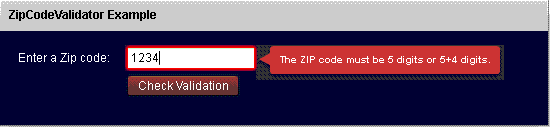
Running Application:
To view this page ensure that Adobe Flash Player version 10.0.0 or greater is installed.



