Validators with DataModel in Flex4
In the following example you can see how we can use validators with DataModel.
In the following example you can see how we can use validators with DataModel.Validators with DataModel in Flex4:
In the following example you can see how we can
use validators with DataModel.
The <mx:PhoneNumberValidator>, <mx:EmailValidator>, <mx:Validator>, <mx:ZipCodeValidator>
and <mx:SocialSecurityValidator> tags declare to validate the phone number,
emial-id, required field, zipcode and socialsecurity field of the data model.
When you click on button without fill the text field then an error message will
be generate.
Example:
|
<?xml version="1.0" encoding="utf-8"?> <s:Application xmlns:fx="http://ns.adobe.com/mxml/2009"xmlns:s=" library://ns.adobe.com/flex/spark"xmlns:mx=" library://ns.adobe.com/flex/mx"minWidth=" 955" minHeight="600"><registration> <uname>{unametxt.text}</uname> <emailid>{emailtxt.text}</emailid> <phoneno>{phonetxt.text}</phoneno> <zipcode>{ziptxt.text}</zipcode> <socials>{socialstxt.text}</socials> </registration> source=" {registration}" property="uname"trigger=" {validatebtn}"triggerEvent=" click"listener=" {unametxt}"/>trigger=" {validatebtn}"triggerEvent=" click"listener=" {emailtxt}"/> <mx:PhoneNumberValidator source="{registration}" property="phoneno"trigger=" {validatebtn}"triggerEvent=" click"listener=" {phonetxt}"/> <mx:ZipCodeValidator source="{registration}" property="zipcode"trigger=" {validatebtn}"triggerEvent=" click"listener=" {ziptxt}"/>trigger=" {validatebtn}"triggerEvent=" click"listener=" {socialstxt}"/> </fx:Declarations> <s:Panel title="Validators with datamodel Example" width="550">chromeColor=" #5F1B0C"/> </mx:FormItem> </mx:Form></s:Application> |
Output:
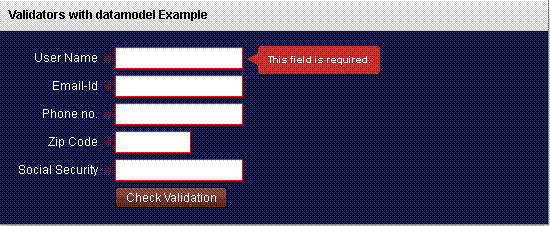
Running Application:
To view this page ensure that Adobe Flash Player version 10.0.0 or greater is installed.



