Validator in Flex4
The Validator class validates the text field value. If the text is blank it will give an error message.
The Validator class validates the text field value. If the text is blank it will give an error message.Validator in Flex4:
The Validator class validates the text field value. If
the text is blank it will give an error message. If you will write anything in
the text field then it will not generate a error message. Basically it is used
for a required field.
The tag of Validator is <mx:Validator>.
Example:
|
<?xml version="1.0" encoding="utf-8"?> <s:Application xmlns:fx="http://ns.adobe.com/mxml/2009"xmlns:s=" library://ns.adobe.com/flex/spark"xmlns:mx=" library://ns.adobe.com/flex/mx"minWidth=" 955" minHeight="600"><![CDATA[ import mx.controls.Alert;]]> </fx:Script> <fx:Declarations>source=" {fname}" property="text" trigger="{btn}"triggerEvent=" click"valid="Alert.show( 'Submitted Successfully');"/> </fx:Declarations> <s:Panel title="Validator Example" width="550">label=" Submit"chromeColor=" #5F1B0C"/> </mx:FormItem></s:Application> |
Output:
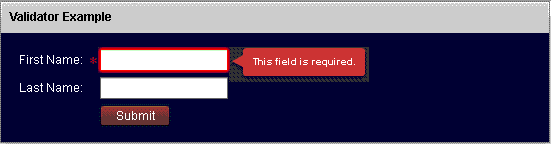
Running Application:
To view this page ensure that Adobe Flash Player version 10.0.0 or greater is installed.



