ToolTip in Flex4
ToolTip is used for display the message.
ToolTip is used for display the message.ToolTip in Flex4:
ToolTip is used for display the message. When user moves a mouse towards a component a message will appear it is a ToolTip and user clicks the mouse button the message disappears. You can set the one ToolTip at a Time. If you do not define a ToolTip on the child of a container the ToolTipManager displays the parent's ToolTip. You will use \n and for escaped newline character in Actionscript and MXML respectively.
Example:
|
<?xml version="1.0" encoding="utf-8"?> <s:Application xmlns:fx="http://ns.adobe.com/mxml/2009"xmlns:s=" library://ns.adobe.com/flex/spark"xmlns:mx=" library://ns.adobe.com/flex/mx"minWidth=" 955" minHeight="600"initialize="tooltipExamp(event)" > <fx:Script><![CDATA[ button.toolTip= "This is a Button \nand it's a tooltip example";} ]]> </fx:Script> <s:Panel title="ToolTip Example"chromeColor=" #555555"color=" #CCCCCC"width=" 224"height=" 141"> <s:Button id="button"label=" Tooltip"toolTip=" This is a Button and it's a tooltip example"x=" 9" y="9"/> </s:Panel></s:Application> |
Output:
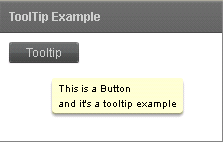
Running Application:
To view this page ensure that Adobe Flash Player version 10.0.0 or greater is installed.



