SwitchSymbolFormatter in FLex4
The SwitchSymbolFormatter Class is used for creating custom Formatters.
The SwitchSymbolFormatter Class is used for creating custom Formatters.SwitchSymbolFormatter in Flex4:
The SwitchSymbolFormatter Class is used for creating
custom Formatters. This Class is used for replacing placeholder characters in a
string with another number string. In this example we useed SocialSecurityNumber
for formatting. The format string is ###-##-#### and the input string is a nine
digit number such as 345678934. After formatting the number will be shown like
345-67-8934. If an error occurs this error will be shown by the error property.
The error property has two types of error values: Invalid value, Invalid format.
It is created by the action script. It has no component.
Example:
|
<?xml version="1.0" encoding="utf-8"?> <s:Application xmlns:fx="http://ns.adobe.com/mxml/2009"xmlns:s=" library://ns.adobe.com/flex/spark"xmlns:mx=" library://ns.adobe.com/flex/mx"minWidth=" 955" minHeight="600" xmlns:local="*"><![CDATA[ import mx.formatters.SwitchSymbolFormatter;{ result = scValidator.validate(); if (result.type==ValidationResultEvent.VALID) {numlbl.text =temp.formatValue( "###-##-####", numtxt.text);} numlbl.text= "Invalid Number";} } ]]> </fx:Script>fontFamily="verdana"> <s:TextInput id="numtxt" text="" width="100%" maxChars="9" color="#000000" fontFamily="verdana"/> <mx:FormItem label="Formatted Social Security Number:" color="#FFFFFF" fontFamily="verdana"> </s:Application> |
Output:
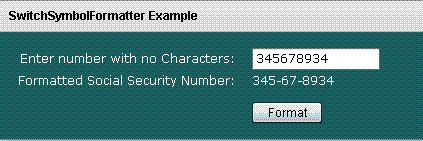
Running Application:
To view this page ensure that Adobe Flash Player version 10.0.0 or greater is installed.



