setStyle() and getStyle() methods Example
If user want to set style properties at the run time, the action script provide two methods to access the object of the related components and access the style property.
If user want to set style properties at the run time, the action script provide two methods to access the object of the related components and access the style property.setStyle() and getStyle() methods example in Flex4:-
If user want to set style properties at the run time, the action script provide two methods to access the object of the related components and access the style property. This method should be used only when you are changing an object?s styles during run time. In this example user can see how to use setStyle() and getStyle() method in your application for the components.
Example:-
|
<?xml version="1.0"?> <s:Application xmlns:fx=" http://ns.adobe.com/mxml/2009"xmlns:mx=" library://ns.adobe.com/flex/mx"xmlns:s=" library://ns.adobe.com/flex/spark"creationComplete="initApp()" >text1.setStyle( "fontSize",13);text1.setStyle( "color",0x00CCFF);text1.setStyle( "fontWeight","bold");text1.setStyle( "fontThickness",10);label1.text=text1.getStyle( "fontThickness");label2.text=text1.getStyle( "fontWeight");} ]]> </fx:Script> <s:VGroup></s:Application> |
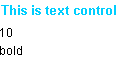
In this example we have created a mx text control and two spark label components and created a method name is initApp() in the action script. The method initApp() call after application creation and set the style properties by setStyle() method through the components instance of objects. After that used getStyle() method to find the style properties for the component and set these properties value as a text for the label components.
Output:-