String in Action Script3
String is a sequence of letters, numbers and other characters binding together in a single value.
String is a sequence of letters, numbers and other characters binding together in a single value.String in Action Script3:-
String is a sequence of letters, numbers and other characters binding together in a single value. String Class is a data type, we have created a variable that have String data type and assign a literal string value in that variable. If user want to work with textual value then it can be use String class in Action Script3. In the Action Script3 , the string value represented in the double or single quotation marks.
Example:-
|
<?xml version="1.0" encoding="utf-8"?> <s:Application xmlns:fx="http://ns.adobe.com/mxml/2009"xmlns:s=" library://ns.adobe.com/flex/spark"xmlns:mx=" library://ns.adobe.com/flex/mx" creationComplete="init();"> <fx:Script><![CDATA[ myText1.text = str; str = "This is another String.";myText2.text = str; } ]]> </fx:Script> <s:Panel width="200" height="200" title="String Class Panel" backgroundColor="0x81B5AA"></s:Application> |
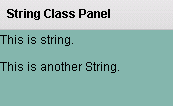
In this example, we have created a variable that have String data type. It means that accept only string value. we have put a string literal as " This is string." and set these string value in the Flex Text control that's display these value. In this example, we have discuss about how to create a string data type or String class object in Action Script3.
Output:-