setStyle() and getStyle() method in Flex4
You can set the style properties of components using setStyle() and getStyle() method.
You can set the style properties of components using setStyle() and getStyle() method.setStyle() and getStyle() method in Flex4:
You can set the style properties of components using
setStyle() and getStyle() method. But it will not set directly. Style properties
of components are set at runtime because these methods are ActionScript method.
The syntax of setStyle() method is:
componentInstance.setStyle(property_name, property_value);
The syntax of getStyle() method is:
var:return_typecomponentInstance.getStyle(property_name);
In this example you can see how we can set the style properties of components
using setStyle() and getStyle() method.
Example:
|
<?xml version="1.0" encoding="utf-8"?> <s:Application xmlns:fx="http://ns.adobe.com/mxml/2009" xmlns:s="library://ns.adobe.com/flex/spark" xmlns:mx="library://ns.adobe.com/flex/mx" minWidth="955" minHeight="600" creationComplete="init()"> <fx:Script> <![CDATA[ public function init():void{ // set style using setStyle method btn.setStyle("color", "Blue"); btn.setStyle("fontSize", 16); btn.setStyle("fontWeight", "bold"); lbl.setStyle("fontSize", 14); lbl.setStyle("color",0x9933FF); } public function clickme(e:Event):void { // using getStyle method if (e.currentTarget.getStyle("color") == 255) { e.currentTarget.setStyle("color", "green"); } else { e.currentTarget.setStyle("color", "Blue"); } } ]]> </fx:Script> <s:Panel title="setStyle() and getStyle() Example" width="288" height="182"> <s:Button id="btn" label="Click me" x="85" y="31" click="clickme(event)"/> <s:Label id="lbl" text="This is a setStyle() and getStyle() method." x="0" y="84"/> </s:Panel> </s:Application> |
Output:
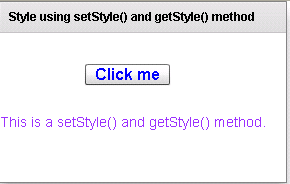
Running Application:
To view this page ensure that Adobe Flash Player version 10.0.0 or greater is installed.



