OLAPDataGrid control in Flex4
The full form of OLAP is online analytical processing. OLAPDataGrid control contains a large amount of data in many dimensions.
The full form of OLAP is online analytical processing. OLAPDataGrid control contains a large amount of data in many dimensions.OLAPDataGrid control in Flex4:
The full form of OLAP is online analytical processing.
OLAPDataGrid control contains a large amount of data in many dimensions. If you
collect the information of product from different region, and from different
customers in a two dimensional spreadsheet this data will be shown in
OLAPDataGrid very easily. You will need a three thing to create a OLAPDataGrid:
1. OLAP Cube
2. OLAP schema
3. OLAP query
The tag of OLAPDataGrid is <mx:OLAPDataGrid>.
Example:
|
<?xml version="1.0" encoding="utf-8"?> <s:Application xmlns:fx="http://ns.adobe.com/mxml/2009"xmlns:s=" library://ns.adobe.com/flex/spark"xmlns:mx=" library://ns.adobe.com/flex/mx"minWidth=" 955" minHeight="600"creationComplete="creationCompleteHandler();" > <fx:Declarations> <!-- Define OALP schema -->dataProvider=" {flatProductData}"id=" myProductCube"complete="runQuery(event);" > <!-- Define Dimentions --> <mx:OLAPDimension name="CustomerDimention">dataField=" revenue"aggregator=" MAX"/><![CDATA[ import mx.rpc.AsyncResponder; import mx.rpc.AsyncToken;[ Bindable] private var flatProductData:ArrayCollection = new ArrayCollection([ {customer: "X", product:"Monitor", quarter:"First", revenue:210, cost:25},{customer: "X", product:"Processor", quarter:"Second", revenue:210, cost:25},{customer: "X", product:"Mouse", quarter:"Third", revenue:250, cost:125},{customer: "X", product:"Keyboard", quarter:"Fourth", revenue:430, cost:75},{customer: "Y", product:"Monitor", quarter:"Second", revenue:125, cost:20},{customer: "Y", product:"Processor", quarter:"Third", revenue:210, cost:20},{customer: "Y", product:"Mouse", quarter:"Fourth", revenue:320, cost:120},{customer: "Y", product:"Keyboard", quarter:"First", revenue:280, cost:70},{customer: "Z", product:"Monitor", quarter:"Third", revenue:375, cost:120},{customer: "Z", product:"Processor", quarter:"Fourth", revenue:430, cost:120},{customer: "Z", product:"Mouse", quarter:"First", revenue:470, cost:220},{customer: "Z", product:"Keyboard", quarter:"Second", revenue:570, cost:170},{customer: "X", product:"Monitor", quarter:"Fourth", revenue:215, cost:90},{customer: "X", product:"Processor", quarter:"First", revenue:210, cost:90},{customer: "X", product:"Mouse", quarter:"Second", revenue:175, cost:190},{customer: "X", product:"Keyboard", quarter:"Third", revenue:670, cost:75},{customer: "Y", product:"Monitor", quarter:"First", revenue:175, cost:20},{customer: "Y", product:"Processor", quarter:"Second", revenue:210, cost:20},{customer: "Y", product:"Mouse",quarter:"Third", revenue:120, cost:120},{customer: "Y", product:"Keyboard", quarter:"Fourth", revenue:310, cost:70},{customer: "Z", product:"Monitor", quarter:"First", revenue:385, cost:120},{customer: "Z", product:"Processor", quarter:"Second", revenue:340, cost:120},{customer: "Z", product:"Mouse", quarter:"Third", revenue:470, cost:220},{customer: "Z", product:"Keyboard", quarter:"Fourth", revenue:270, cost:170},{customer: "X", product:"Monitor", quarter:"First", revenue:100, cost:25},{customer: "X", product:"Processor", quarter:"Second", revenue:150, cost:25},{customer: "X", product:"Mouse", quarter:"Third", revenue:200, cost:125},{customer: "X", product:"Keyboard", quarter:"Fourth", revenue:300, cost:75},{customer: "Y", product:"Monitor", quarter:"Second", revenue:175, cost:20},{customer: "Y", product:"Processor", quarter:"Third", revenue:100, cost:20},{customer: "Y", product:"Mouse", quarter:"Fourth", revenue:270, cost:120},{customer: "Y", product:"Keyboard", quarter:"First", revenue:370, cost:70},{customer: "Z", product:"Monitor", quarter:"Third", revenue:410, cost:120},{customer: "Z", product:"Processor", quarter:"Fourth", revenue:300, cost:320},{customer: "Z", product:"Mouse", quarter:"First", revenue:510, cost:220},{customer: "Z", product:"Keyboard", quarter:"Second", revenue:620, cost:170},{customer: "X", product:"Monitor", quarter:"Fourth", revenue:215, cost:90},{customer: "X", product:"Processor", quarter:"First", revenue:210, cost:90},{customer: "X", product:"Mouse", quarter:"Second", revenue:175, cost:190},{customer: "X", product:"Keyboard", quarter:"Third", revenue:420, cost:75},{customer: "Y", product:"Monitor", quarter:"First", revenue:240, cost:20},{customer: "Y", product:"Processor", quarter:"Second", revenue:100, cost:20},{customer: "Y", product:"Mouse", quarter:"Third", revenue:270, cost:120},{customer: "Y", product:"Keyboard", quarter:"Fourth", revenue:370, cost:70},{customer: "Z", product:"Monitor", quarter:"First", revenue:375, cost:120},{customer: "Z", product:"Processor", quarter:"Second", revenue:420, cost:120},{customer: "Z", product:"Mouse", quarter:"Third", revenue:680, cost:220},{customer: "Z", product:"Keyboard", quarter:"Fourth", revenue:570, cost:170}]); // Refresh a OLAPCube public function creationCompleteHandler():void {myProductCube.refresh(); } // Create Quaryquery.getAxis(OLAPQuery.ROW_AXIS); productSet.addElements( cube.findDimension( "ProductDimention").findAttribute("Product").children);rowQueryAxis.addSet(productSet); // instance of OLAPQueryAxis class for columnquery.getAxis(OLAPQuery.COLUMN_AXIS); // instance of OLAPSet classquarterSet.addElements( cube.findDimension( "QuarterDimention").findAttribute("Quarter").children);colQueryAxis.addSet(quarterSet); return query;} token.addResponder( new AsyncResponder(showResult, showFault));} // Query Fault public function showFault(result:Object, token:Object):void {Alert.show( "Error in query.");} // Query SuccessAlert.show( "No results from query.");} productDataGrid.dataProvider= result as OLAPResult;} ]]> </fx:Script>x=" 11" y="11"width=" 359" height="155"/> </s:Panel></s:Application> |
Output:
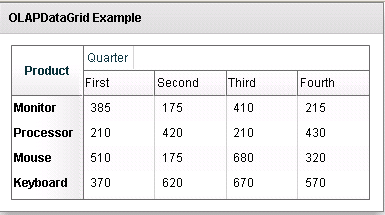
Running Application:
To view this page ensure that Adobe Flash Player version 10.0.0 or greater is installed.



