NumericStepper in Flex4
The NumericStepper control is used both in MX and Spark's component. It uses the number of an ordered list. It has the single-line input text field and a pair of arrow for increase or decrease the valid values.
The NumericStepper control is used both in MX and Spark's component. It uses the number of an ordered list. It has the single-line input text field and a pair of arrow for increase or decrease the valid values.NumericStepper control in Flex4:
The NumericStepper control is used both in MX and Spark's component. It uses
the number of an ordered list. It has the single-line input text field and a
pair of arrow for increase or decrease the valid values. When you press up arrow
the numeric value increases and pressed down arrow the value
decreases according to the snapInterval. You can hold the up arrow and down arrow for
increases or decreases the value until you release the mouse button. The pair of
arrow will appear right of the text field. You can change the numeric value in
the text field.
The tag of NumericStepper control is <s:NumericStepper>.
Example:
|
<?xml version="1.0" encoding="utf-8"?> <s:Application xmlns:fx="http://ns.adobe.com/mxml/2009"xmlns:s=" library://ns.adobe.com/flex/spark"xmlns:mx=" library://ns.adobe.com/flex/mx"> <s:Panel title="NumericStepper Example" width="205" height="107"color="#990000"> <s:NumericStepper id="numericStepper"minimum=" 0"maximum=" 100"snapInterval=" 5"x=" 68" y="23"color=" white"contentBackgroundColor=" #1D3153"/> </s:Panel></s:Application> |
In this example you can see how we can use a NumericStepper control in Flex4.
Output:
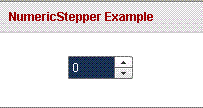
Running Application:
To view this page ensure that Adobe Flash Player version 10.0.0 or greater is installed.



