NumberValidator in Flex4
The NumberValidator class validates a number. You can specify the minimum and maximum range of value by using the minValue and maxValue property.
The NumberValidator class validates a number. You can specify the minimum and maximum range of value by using the minValue and maxValue property.NumberValidator in Flex4:
The NumberValidator class validates a number. You
can specify the minimum and maximum range of value by using the minValue and
maxValue property. You can specify the domain property for integer value. You
can check the value is negative or not by using allowNegative property.
The tag of NumberValidator is <mx:NumberValidator>.
Example:
|
<?xml version="1.0" encoding="utf-8"?> <s:Application xmlns:fx="http://ns.adobe.com/mxml/2009"xmlns:s=" library://ns.adobe.com/flex/spark"xmlns:mx=" library://ns.adobe.com/flex/mx"minWidth=" 955" minHeight="600"><![CDATA[ import mx.controls.Alert;]]> </fx:Script> <fx:Declarations><numberInfo> <Number>{agetxt.text}</Number> </numberInfo> </fx:Model> <mx:NumberValidator source="{agetxt}" property="text"integerError=" Enter Integer value"minValue=" 21" maxValue="35" domain="int"trigger=" {btn}" triggerEvent="click"valid="Alert.show( 'Validation Successful');"/> </fx:Declarations> <s:Panel title="NumberValidator Example" width="550"></s:Application> |
Output:
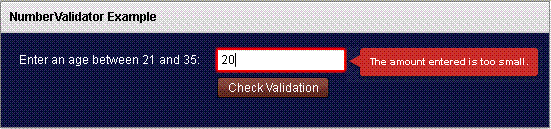
Running Application:
To view this page ensure that Adobe Flash Player version 10.0.0 or greater is installed.



