NavigatorcontentContainer in Flex4
The NavigatorContent Container is a Flex4 container that's used to switch between multiple children which are other containers.
The NavigatorContent Container is a Flex4 container that's used to switch between multiple children which are other containers.
NavigatorContent Container in Flex4:
The NavigatorContent Container is a Flex4 container that's used to switch
between multiple children which are other containers. It is place inside of MX
navigator containers. In this example we have create a NavigatorContent
container. A NavigatorContent must be the child of an MX navigator container. If
user want to use this container use <s:NavigatorContent> tag in the application.
Example:
<?xml version="1.0" encoding="utf-8"?>
<s:Application
xmlns:fx=" http://ns.adobe.com/mxml/2009 "
xmlns:s="
library://ns.adobe.com/flex/spark "
xmlns:mx="
library://ns.adobe.com/flex/mx " >
<s:Panel
title=" NavigatorContent container
Example " >
<mx:TabNavigator
width=" 270 "
height=" 462 " >
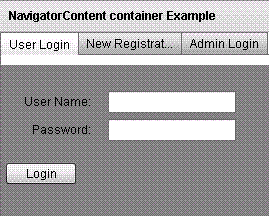
<s:NavigatorContent label=" User
Login " backgroundColor=" 0x808080 " >
<s:layout>
<s:VerticalLayout
paddingTop=" 10 "
paddingLeft=" 5 " />
</s:layout>
<mx:Form>
<mx:FormItem
label=" User Name: " >
<s:TextInput
id=" username "
width=" 100% " />
</mx:FormItem>
<mx:FormItem
label=" Password: " >
<s:TextInput
id=" userpassword "
width=" 100% "
displayAsPassword=" true " />
</mx:FormItem>
</mx:Form>
<s:HGroup>
<s:Button
label=" Login " />
</s:HGroup>
</s:NavigatorContent>
<s:NavigatorContent label=" New
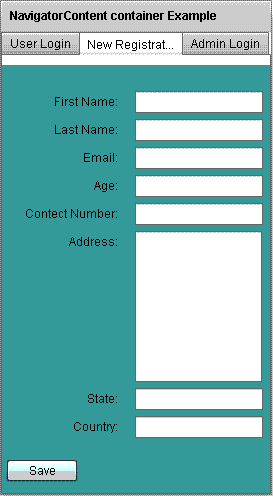
Registration " backgroundColor=" 0x408080 " >
<s:layout>
<s:VerticalLayout
paddingTop=" 10 "
paddingLeft=" 5 " />
</s:layout>
<mx:Form>
<mx:FormItem
label=" First Name: " >
<s:TextInput
id=" firstname "
width=" 100% " />
0
</mx:FormItem>
<mx:FormItem
label=" Last Name: " >
<s:TextInput
id=" lastname "
width=" 100% " />
1
</mx:FormItem>
<mx:FormItem
label=" Email: " >
<s:TextInput
id=" email "
width=" 100% " />
2
</mx:FormItem>
<mx:FormItem
label=" Age: " >
<s:TextInput
id=" age "
width=" 100% " />
3
</mx:FormItem>
<mx:FormItem
label=" Contect Number: " >
<s:TextInput
id=" contect "
width=" 100% " />
4
</mx:FormItem>
<mx:FormItem
label=" Address: " >
<s:TextArea
id=" address "
width=" 127 " />
5
</mx:FormItem>
<mx:FormItem
label=" State: " >
<s:TextInput
id=" state "
width=" 100% " />
6
</mx:FormItem>
<mx:FormItem
label=" Country: " >
<s:TextInput
id=" country "
width=" 100% " />
7
</mx:FormItem>
</mx:Form>
<s:HGroup>
8
<s:Button
label=" Save " />
</s:HGroup>
</s:NavigatorContent>
9
<s:NavigatorContent label=" Admin
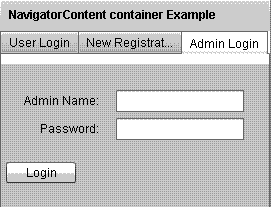
Login " backgroundColor=" 0xC0C0C0 " >
<s:layout>
<s:VerticalLayout
paddingTop=" 10 "
paddingLeft=" 5 " />
0
</s:layout>
<mx:Form>
<mx:FormItem
label=" Admin Name: " >
1
<s:TextInput
id=" adminname "
width=" 100% " />
</mx:FormItem>
<mx:FormItem
label=" Password: " >
2
<s:TextInput
id=" password "
width=" 100% "
displayAsPassword=" true " />
</mx:FormItem>
</mx:Form>
3
<s:HGroup>
<s:Button
label=" Login " />
</s:HGroup>
4
</s:NavigatorContent>
</mx:TabNavigator>
</s:Panel>
5
</s:Application>
Output:-
6
Running Application:
To view this page ensure that Adobe Flash Player version
10.0.0 or greater is installed.
7
Either scripts and active content are not permitted to run or Adobe Flash Player version
10.0.0 or greater is not installed.
Download this code