Home Tutorial Flex Flex4 Components Inline Embedded Font in Flex4


Inline Embedded Font in Flex4
Posted on: June 23, 2010 at 12:00 AM
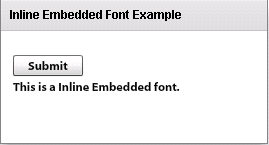
In this example you can see how we can use a inline embedded font in flex application.

Inline Embedded font  in Flex4:

In this example you can see how we can use a inline embedded font in flex application. You will set the fontFamily property of the component in inline embedded font.

Example:

<?xml version="1.0" encoding="utf-8"?>

<s:Application xmlns:fx="http://ns.adobe.com/mxml/2009"

xmlns:s="library://ns.adobe.com/flex/spark"

xmlns:mx="library://ns.adobe.com/flex/mx"

minWidth="955" minHeight="600">

<!-- Using Inline Embedded fonts -->

<fx:Style>

@namespace s "library://ns.adobe.com/flex/spark";

@font-face {

src:url("MyriadWebPro-Bold.ttf");

fontFamily: fontFamily1;

embedAsCFF: true;

}

</fx:Style>

<s:Panel title="Inline Embedded Font Example" width="268" height="145">

<s:VGroup x="12" y="24" width="241" height="48" >

<s:Button label="Submit" fontFamily="fontFamily1"/>

<s:Label text="This is a Inline Embedded font." fontFamily="fontFamily1"/>

</s:VGroup>

</s:Panel>

</s:Application>

Output:

Running Application:

To view this page ensure that Adobe Flash Player version 10.0.0 or greater is installed.

Download this code

Related Tags for Inline Embedded Font in Flex4:


Ask Questions?

If you are facing any programming issue, such as compilation errors or not able to find the code you are looking for.

Ask your questions, our development team will try to give answers to your questions.