HDivideBox Container in Flex4
The HDividedBox container is a MX component. There is no Spark Component. The HDividedBox container is used for horizontal layout in which the children components are arrange in horizontal manner.
The HDividedBox container is a MX component. There is no Spark Component. The HDividedBox container is used for horizontal layout in which the children components are arrange in horizontal manner.HDividedBox container in Flex4:
The HDividedBox container is a MX component.
There is no Spark Component.
The HDividedBox container is used for horizontal layout in which the children
components are arrange in horizontal manner. It is similar to a HBox container,
except the HDividedBox container contains a divider between each child
component. You can use a mouse to move a divider for resize the component area.
The tag of HDividedBox Container is <mx:HDividedBox>.
Example:
|
<?xml version="1.0" encoding="utf-8"?> <s:Application xmlns:fx="http://ns.adobe.com/mxml/2009" xmlns:s="library://ns.adobe.com/flex/spark" xmlns:mx="library://ns.adobe.com/flex/mx" minWidth="955" minHeight="600"> <fx:Script> <![CDATA[ private function grid_initialize():void { grid.dataProvider = [ {aName:'Bikrant', DOB:'01/01/1986', City:'Delhi', State:'NewDelhi'}, {aName:'Brijesh', DOB:'15/07/1984', City:'Noida', State:'Uttar Pradesh'}, {aName:'Gaurav', DOB:'27/06/1989', City:'Mumbai', State:'Maharashtra'} ]; } ]]> </fx:Script> <s:Panel title="HDividedBox Container Example" width="520" height="233"> <mx:HDividedBox x="11" y="11"> <mx:Tree id="tree" width="60%" height="100%" labelField="@label"> <fx:XMLList id="collegedata"> <node label="College"> <node label="History"/> <node label="About us"/> <node label="Courses"> <node label="B.Tech."> <node label="CS"/> <node label="EC"/> <node label="EI"/> <node label="IT"/> </node> <node label="MBA"> <node label="Finance"/> <node label="Marketing"/> <node label="HR"/> </node> <node label="MCA"/> <node label="B.Pharma."/> </node> <node label="Department"> <node label="Computer Science"/> <node label="Electronics"/> <node label="Managenent"/> </node> <node label="Feedback"/> <node label="Contact us"/> </node> </fx:XMLList> </mx:Tree> <mx:DataGrid id="grid" width="100%" height="100%" initialize="grid_initialize();"/> </mx:HDividedBox> </s:Panel> &</s:Application> |
Output:
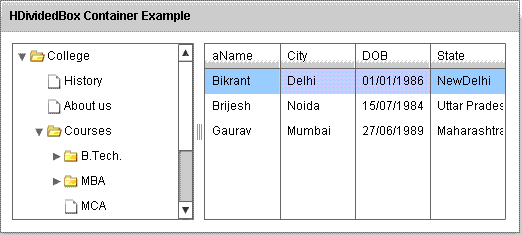
Running Application:
To view this page ensure that Adobe Flash Player version 10.0.0 or greater is installed.



