Displaying grouped data in AdvancedDataGrid
Grouped data is used the place of hierarchical data. Basically it is a flat data in which you can arrange it in hierarchical data.
Grouped data is used the place of hierarchical data. Basically it is a flat data in which you can arrange it in hierarchical data.Displaying grouped data in AdvancedDataGrid:
Grouped data is used the place of hierarchical data. Basically it is a flat data in which you can arrange it in hierarchical data. We make a instance of the GroupingCollection2 class from your flat data. In this example you can see how we can use Grouped Data in AdvancedDataGrid control.
Example:
|
<?xml version="1.0" encoding="utf-8"?> <s:Application xmlns:fx="http://ns.adobe.com/mxml/2009"xmlns:s=" library://ns.adobe.com/flex/spark"xmlns:mx=" library://ns.adobe.com/flex/mx"minWidth=" 955" minHeight="600"> <fx:Script><![CDATA[ import mx.collections.ArrayCollection;[ Bindable] private var student:ArrayCollection = new ArrayCollection([{Course: 'Course', CourseName:'B.Sc.', Branch:'Physics', Girls:60, Boys:120, TotalStudent:180,PASSinper:98.0, FAILinper:2.0}, {Course:'Course', CourseName:'B.Sc.', Branch:'Mathematics', Girls:50, Boys:150, TotalStudent:200, PASSinper:98.5, FAILinper:1.5}, {Course:'Course', CourseName:'B.Sc.', Branch:'Chemistry', Girls:100, Boys:50, TotalStudent:150, PASSinper:97.0, FAILinper:3.0}, {Course:'Course', CourseName:'B.tech.', Branch:'CS', Girls: 45, Boys:75, TotalStudent:120, PASSinper:99.0, FAILinper:1.0}, {Course:'Course', CourseName:'B.tech.', Branch:'IT', Girls: 55, Boys:65, TotalStudent:120, PASSinper:99.5, FAILinper:0.5}, {Course:'Course', CourseName:'B.tech.', Branch:'EC', Girls: 25, Boys:95, TotalStudent:120, PASSinper:96.7, FAILinper:3.3}, {Course:'Course', CourseName:'B.tech.', Branch:'EI', Girls: 40, Boys:80, TotalStudent:120, PASSinper:95, FAILinper:5}, {Course:'Course', CourseName:'B.tech.', Branch:'Mechanical', Girls:10, Boys: 80, TotalStudent:90, PASSinper:97.5, FAILinper:2.5}, {Course:'Course', CourseName:'B.tech.', Branch:'Civil', Girls: 15, Boys:45, TotalStudent:60, PASSinper:92, FAILinper:8}, {Course:'Course', CourseName:'B.Pharma.', Branch:'Pharmacy', Girls:70, Boys:130, TotalStudent:200, PASSinper:99.8, FAILinper:0.2}, {Course:'Course', CourseName:'M.B.A.', Branch:'HR', Girls:48, Boys:72, TotalStudent:120, PASSinper:100, FAILinper:0}, {Course:'Course', CourseName:'M.B.A.', Branch:'Finance', Girls:40, Boys:80, TotalStudent:120, PASSinper:85, FAILinper:15}, {Course:'Course', CourseName:'M.B.A.', Branch:'Marketing', Girls:20, Boys:100, TotalStudent:120, PASSinper:99, FAILinper:1}, {Course:'Course', CourseName:'M.B.A.', Branch:'IT & HR', Girls:30, Boys:90, TotalStudent:120, PASSinper:100, FAILinper:0}, {Course:'Course', CourseName:'M.C.A.', Branch:'Computer Science', Girls:30, Boys:90, TotalStudent: 120, PASSinper:99.1, FAILinper:0.9}, ]); ]]> </fx:Script> <s:Panel title="Displaying grouped data in AdvancedDataGrid" height="470" width="831"> <mx:AdvancedDataGridheight=" 414"x=" 13" y="13" initialize="gc2.refresh();"> <mx:dataProvider> <mx:GroupingCollection2 id="gc2" source="{student}"> <mx:Grouping label="Course"> <mx:GroupingField name="Course"/> <mx:GroupingField name="CourseName"/> </mx:Grouping> </mx:GroupingCollection2> </mx:dataProvider> <mx:columns> <mx:AdvancedDataGridColumn dataField="Course"/> <mx:AdvancedDataGridColumn dataField="CourseName" headerText="CourseName"/> <mx:AdvancedDataGridColumn dataField="Branch"/> <mx:AdvancedDataGridColumn dataField="Girls"/> <mx:AdvancedDataGridColumn dataField="Boys"/> <mx:AdvancedDataGridColumn dataField="TotalStudent"/> <mx:AdvancedDataGridColumn dataField="PASSinper"/> <mx:AdvancedDataGridColumn dataField="FAILinper"/> </mx:columns> </mx:AdvancedDataGrid> </s:Panel></s:Application> |
Output:
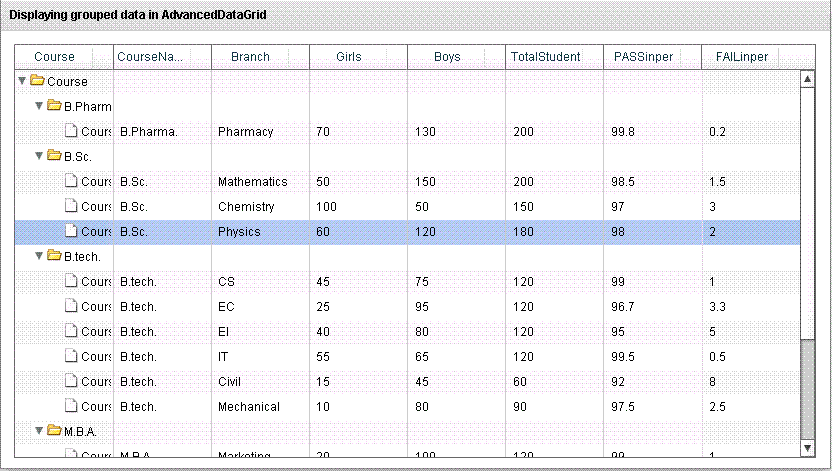
Running Application:
To view this page ensure that Adobe Flash Player version 10.0.0 or greater is installed.



