String fromCharCode() method example in Action Script3
String provide a method to find characters by the character code using fromCharCode() method.
String provide a method to find characters by the character code using fromCharCode() method.String fromCharCode() method example in Action Script3:-
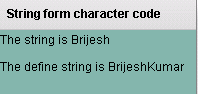
String provide a method to find characters by the character code using fromCharCode() method. we have define a string using this method. User can see how to use this method to find string.
Example:-
|
<?xml version="1.0" encoding="utf-8"?> <s:Application xmlns:fx="http://ns.adobe.com/mxml/2009"xmlns:s=" library://ns.adobe.com/flex/spark"xmlns:mx=" library://ns.adobe.com/flex/mx" creationComplete="init();"> <fx:Script><![CDATA[ mytext1.text = "The string is " + str;mytext2.text = "The define string is " + (String)(String.fromCharCode(66, 114, 105, 106,101, 115, 104, 75, 117, 109, 97, 114));} ]]> </fx:Script></s:Application> |
Output:-