CreditCardValidator in Flex4
The CreditCardValidator class is used for validate a credit card number. It checks the length and correct prefix of the credit card number and check the number is currently active or not.
The CreditCardValidator class is used for validate a credit card number. It checks the length and correct prefix of the credit card number and check the number is currently active or not.CreditCardValidator in Flex4:
The CreditCardValidator class is used for validate a
credit card number. It checks the length and correct prefix of the credit card
number and check the number is currently active or not. The cardNumberSource and
cardNumberProperty properties are used for check the location of the credit card
number, and the cardTypeSource and cardTypeProperty properties are used to
specify the location of the credit card type to validate. The length of the
credit card number are following.
1. Visa: 13 or 16 digits
2. MasterCard: 16 digits
3. American Express: 15 digits
The tag of CreditCardValidator is <mx:CreditCardValidator>.
Example:
|
<?xml version="1.0" encoding="utf-8"?> <s:Application xmlns:fx="http://ns.adobe.com/mxml/2009"xmlns:s=" library://ns.adobe.com/flex/spark"xmlns:mx=" library://ns.adobe.com/flex/mx"minWidth=" 955" minHeight="600"><fx:Script> <![CDATA[ import mx.controls.Alert; ]]> </fx:Script> <fx:Declarations> <fx:Model id="creditcard"> <card> <cardType>{drp.selectedItem.data}</cardType> <cardNumber>{numberInput.text}</cardNumber> </card> </fx:Model> <mx:CreditCardValidator id="creditcardV" cardTypeSource="{creditcard}" cardTypeProperty="cardType" cardNumberSource="{creditcard}" cardNumberProperty="cardNumber" trigger="{btn}" triggerEvent="click" cardTypeListener="{drp}" cardNumberListener="{numberInput}" valid="Alert.show('Validation Successful');"/> </fx:Declarations> <s:Panel title="CreditCardValidator
Example" width="550"> <mx:Form width="548" backgroundColor="#101446" color="#FFFFFF"> <mx:FormItem label="Card Type"> <s:DropDownList
id="drp" width="160"
prompt="Card Type" color="#000000"> <s:ArrayCollection id="cardData"> <fx:Object label="American Express" data="American Express"/> <fx:Object label="MasterCard"
data="MasterCard"/> <fx:Object label="Visa" data="Visa"/> </s:ArrayCollection> </s:DropDownList> </mx:FormItem> <mx:FormItem label="Credit Card Number"> <s:TextInput id="numberInput"
color="#000000"/> </mx:FormItem> <mx:FormItem> <s:Button id="btn"
label="Check Validation"
chromeColor="#5F1B0C"/> </mx:FormItem> </mx:Form> </s:Panel> </s:Application> |
Output:
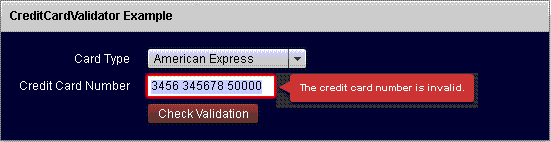
Running Application:
To view this page ensure that Adobe Flash Player version 10.0.0 or greater is installed.

Download this code


