ColumnChart Control in Flex4
The ColumnChart Control is a MX Component. There is no Spark component.
The ColumnChart Control is a MX Component. There is no Spark component.ColumnChart Control in Flex4:
The ColumnChart Control is a MX Component. There is no Spark component. The ColumnChart control represents the data in a vertical bars whose height determines the value of the data. You can provide the data to the chart control by using data provider property. You will use <mx:horizontalAxis> or <mx:verticalAxis> and <mx:Series> in it. You will use xField, yField, minField and displayName property for series. You can use more than one series in it. You can set the color by using <mx:SolidColor> and <mx:SolidColorStroke>. It's essentially like a BarChart rotate 90 degree Anticlockwise. The tag of ColumnChart Control is <mx:ColumnChart>.
Example:/strong>
|
<?xml version="1.0" encoding="utf-8"?> <s:Application xmlns:fx="http://ns.adobe.com/mxml/2009"xmlns:s=" library://ns.adobe.com/flex/spark"xmlns:mx=" library://ns.adobe.com/flex/mx"minWidth=" 955" minHeight="600"> <fx:Declarations> <s:SolidColor id="s1" color="#990000" alpha=".3"/> <s:SolidColor id="s2" color="#808080" alpha=".3"/> <s:SolidColor id="s3" color="#cc00cc" alpha=".3"/> <s:SolidColorStroke id="scs1" color="#990000" weight="2"/> <s:SolidColorStroke id="scs2" color="#808080" weight="2"/> <s:SolidColorStroke id="scs3" color="#cc00cc" weight="2"/> </fx:Declarations> <fx:Script><![CDATA[ import mx.collections.ArrayCollection;[ Bindable] public var student:ArrayCollection = new ArrayCollection([{Stream: "Management", Girls:1000, Boys:1400, TotalStudent:2400},{Stream: "Computer Science", Girls:800, Boys:1200, TotalStudent:2000},{Stream: "Mechanical", Girls:200, Boys:1500, TotalStudent:1700},{Stream: "Electical", Girls:800, Boys:850, TotalStudent:1650},{Stream: "Electronics", Girls:500, Boys:1000, TotalStudent:1500},{Stream: "Civil", Girls:300, Boys:900, TotalStudent:1200}]); ]]> </fx:Script> <s:Panel title="ColumnChart Control Example" width="627" height="542"> <s:layout> <s:VerticalLayout/> </s:layout> <mx:ColumnChart id="cchart" dataProvider="{student}" showDataTips="true" width="621"fontFamily="verdana"> <mx:verticalAxis> <mx:LinearAxis title="Number of Students" /> </mx:verticalAxis> <mx:horizontalAxis> <mx:CategoryAxis dataProvider="{student}" categoryField="Stream"/> </mx:horizontalAxis> <mx:series> <mx:ColumnSeries id="cs1"xField=" Stream"yField=" Girls"displayName=" Girls"fill=" {s1}"stroke=" {scs1}"/> <mx:ColumnSeries id="cs2"xField=" Stream"yField=" Boys"displayName=" Boys"fill=" {s2}"stroke=" {scs2}"/> <mx:ColumnSeries id="cs3"xField=" Stream"yField=" TotalStudent"displayName=" TotalStudent"fill=" {s3}"stroke=" {scs3}"/> </mx:series> </mx:ColumnChart> <s:HGroup> <mx:Legend dataProvider="{cchart}"/> <s:VGroup> <s:RadioButton groupName="sel" label="Girls" click="cs1.visible= true, cs2.visible= false,cs3.visible= false" fontFamily="verdana"/> <s:RadioButton groupName="sel" label="Boys" click="cs1.visible= false, cs2.visible= true,cs3.visible= false" fontFamily="verdana"/> <s:RadioButton groupName="sel" label="TotalStudent" click="cs1.visible= false, cs2.visible=false, cs3.visible= true" fontFamily="verdana"/> <s:RadioButton groupName="sel" label="All" click="cs1.visible= true, cs2.visible= true,cs3.visible= true" fontFamily="verdana" selected="true"/> </s:VGroup> </s:HGroup> </s:Panel></s:Application> |
Output:
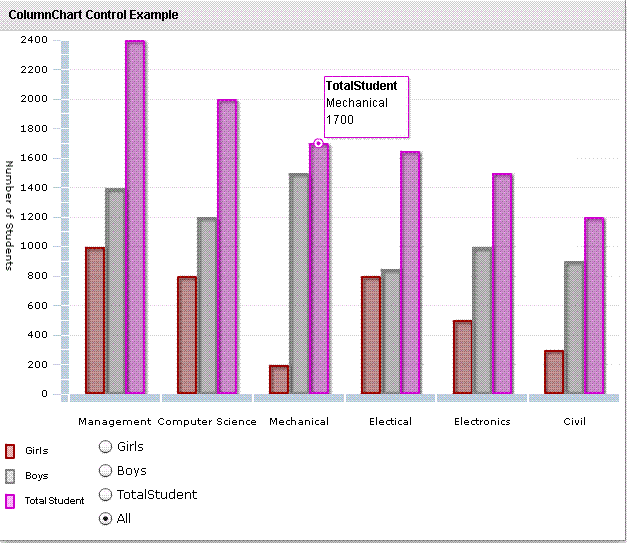
Running Application:
To view this page ensure that Adobe Flash Player version 10.0.0 or greater is installed.



