Tree in Flex
Tutorial Tree in Flex will illustrate various features of Tree, The Tree control is much like the folder explorer feature of window. It helps us to explore the folders without moving inside to each folder, we can see the list of folders and files of each folder by clicking the folder icon. Example will helps you to learn it more preciesely.
Tutorial Tree in Flex will illustrate various features of Tree, The Tree control is much like the folder explorer feature of window. It helps us to explore the folders without moving inside to each folder, we can see the list of folders and files of each folder by clicking the folder icon. Example will helps you to learn it more preciesely.The Tree control in Adobe Flex
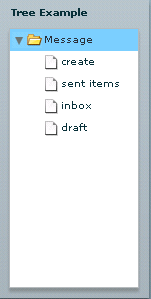
The Tree control is much like the folder explorer feature of window. It helps us to explore the folders without moving inside to each folder, we can see the list of folders and files of each folder by clicking the folder icon.
Each folder is called node, it could be leaf (i.e. it does not contain any files or folders) or branch (i.e. it has files and folders).
In general hierarchical data provider, such as XML, provides the data. We should use ArrayCollection and XMLListCollection object if the data of the Tree is dynamic in nature.
DefaultDataDescriptor (Default descriptor data of tree to parse and manipulate data) class supports the following data types:
- Collections
- XML
- Other Objects
Flex Tree Component Example 1:ong> <?xml version="1.0" encoding="utf-8"?> <mx:Application
<mx:Panel>
</mx:Panel>
</mx:Application>
Output:trong>