
Struts 2 Date Validator


The Date validator in the Struts 2 Framework checks
whether the supplied date lies within a specific range or not. If the value
supplied does not lie in the specified range, it generates an error message.
The error message is supplied
between the <message> </message> tag. The following example demonstrates
how to use the date validator to check the input range.
[ NOTE: If date converter is not specified then XWorkBasicConverter
will kick in to do the date conversion, which by default uses the Date.SHORT
format (using a programmatically specified locale else falling back to the
system default locale).]
Follow the steps to develop the date range validator :
Step 1: Create the struts.xml file and add the following xml snippet in the struts.xml file.
<?xml version="1.0" encoding="UTF-8" ?><!DOCTYPE struts PUBLIC
"-//Apache Software Foundation//DTD Struts Configuration 2.0//EN"
"http://struts.apache.org/dtds/struts-2.0.dtd">
<struts>
<!-- Rose India Struts 2 Tutorials -->
<constant name="struts.enable.DynamicMethodInvocation" value="false" />
<constant name="struts.devMode" value="true" />
<package name="roseindia" namespace="/roseindia" extends="struts-default">
<!-- Add actions here -->
<!-- date validation -->
<action name="dateValidation">
<result>/pages/dateInputForm.jsp</result>
</action>
<action name="dateValidation1" class="net.roseindia.DateVaLidationAction">
<result name="input">/pages/dateInputForm.jsp</result>
<result name="error">/pages/dateInputForm.jsp</result>
<result>/pages/dateSuccess.jsp</result>
</action>
<!-- Add actions here -->
</package>
<!-- Add packages here -->
</struts>
Step 2 : Create the input jsp form i.e.
dateInputForm.jsp
<%@ taglib prefix="s" uri="/struts-tags" %>
<html>
<head>
<title>Input form</title>
<link href="<s:url value="/css/main.css"/>" rel="stylesheet"
type="text/css"/>
<s:head/>
</head>
<body>
<s:form method="POST" action="dateValidation1">
</td>
</tr>
<s:textfield label="Enter Joining Date of Employee" name="joiningdate"/>
<s:submit />
</s:form>
</body>
</html>
Step 3 : Create an Action class.
DateVaLidationAction.java
package net.roseindia;import com.opensymphony.xwork2.ActionSupport;
import com.opensymphony.xwork2.*;
import java.util.*;
import java.text.*;
public class DateVaLidationAction extends ActionSupport implements Validateable {
private Date joiningdate=null;
public void setJoiningdate(Date joiningdate){
this.joiningdate = joiningdate;
}
public Date getJoiningdate(){
return joiningdate;
}
}
Step 4 : Create a Date validator with in an xml file:
The validation.xml format is either <ActionClassName>-validation.xml or <ActionClassName>-<ActionAliasName>-validation.xml.
Date validator: This Field Validator checks if the date supplied is within a specific range. If it is valid and lies within the specified range then you are sent to the dateSuccess.jsp page. Otherwise, it displays the message given in the xml file (e.g. Joining date must be supplied between 01/01/1990 and 01/01/2000.). The date validator takes the following parameters:
- fieldName - This is the field name of the validator.
- Required if working with Plain Validator Syntax. - min - This is the min date range. If not specified, it will not be checked.
- max - This is the max date range. If not specified, it will not be checked.
DateVaLidationAction-validation.xml
<?xml version="1.0" encoding="UTF-8"?>
<!DOCTYPE validators PUBLIC
"-//OpenSymphony Group//XWork Validator 1.0.2//EN"
"http://www.opensymphony.com/xwork/xwork-validator-1.0.2.dtd">
<validators>
<field name="joiningdate">
<field-validator type="date">
<param name="min">01/01/1990</param>
<param name="max">01/01/2000</param>
<message>Joining date must be supplied between ${min} and ${max}</message>
</field-validator>
</field>
</validators>
When any date that has to be passed in the
text field by the user is correct then dateSuccess.jsp
page is displayed as shown below:
"Employee Joining Date:
12/11/1998 " message.
dateSuccess.jsp
<%@page language="java" %><html>
<head>
<title>Correct entry</title>
</head>
<body>
<b>Employee Joining Date: </b><%=request.getParameter("joiningdate") %>
</body>
</html>
Output:
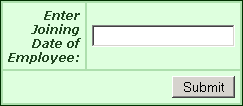
When this application executes, the following page is recieved:
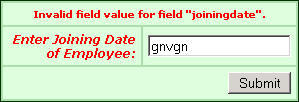
If you enter the wrong data or text then you get:
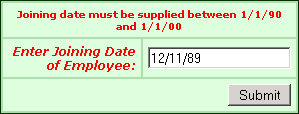
If you enter the date below the range:
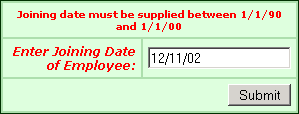
If you enter the date out of the range, then you get the output as:
If you enter the date lying between the specified range:

Then you get the output message as shown:

