
Struts ActionSupport class provides the default implementation of the most common actions. It provides a collection of methods. Some of the common methods are-
execute() - This method executed automatically when action is called. This is default implemented method subclasses should implement this method by proving their business logic.
validate() - This method is default implemented method subclasses should override this method to provide validation.
clearErrors() - This method can be used when you want to continue execution, and want to clear the state of the action.
pause() - This method stops/pause the method execution immediately and returns the action to the specific result such as Action.ERORR, Action.SUCCSESS, Action.INPUT. When the next time this action is called it resumes immediately.
clearErrorsAndMessages() - It clears all the error and messages.
clearErrors() - It clears all the errors().
clearMessages() - It clears all the messages().
ActionSupport class also provides some fields LOG, textProvider, validationAware
An example of ActionSupport class is given below
actionsupport.jsp
<%@ page contentType="text/html; charset=UTF-8" %>
<%@ taglib prefix="s" uri="/struts-tags" %>
<html>
<head>
<title><s:text name="ActionSupportExample.message"/></title>
</head>

<body>
<h2><s:property value="message"/></h2>
<a href="/struts221/">Back to Index page</a>
</body>
</html
ActionSupportExample.java
package net.roseindia;

import com.opensymphony.xwork2.ActionSupport;

public class ActionSupportExample extends ActionSupport {

    public String execute() throws Exception {
        setMessage(getText(ACTIONMESSAGE));
        System.out.println("Some Action Support Messages");
		return SUCCESS;
    }

   public static final String ACTIONMESSAGE = "ActionSupportExample.message";
   private String message;

   public String getMessage() {
        return message;
    }

    public void setMessage(String message) {
        this.message = message;
    }
}
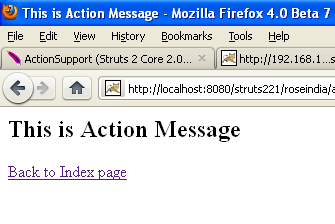
Do the following mapping struts.xml<package name="roseindia" namespace="/roseindia" extends="struts-default"> <action name="actionSupport" class="net.roseindia.ActionSupportExample"> <result>/jsp/actionsupport.jsp</result> </action> </package>When you run this application it will display message as shown below:
 |
Advertisements
Ads
Ads
