
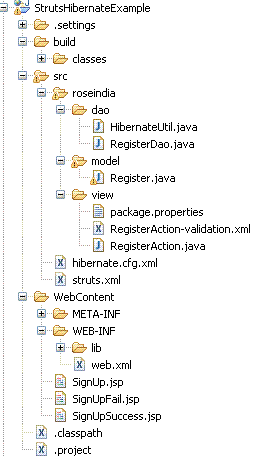
In this example, We will discuss about the Hibernate Integration using struts2.2.1. In this example,we take the input from the user by a form add save the detail in the database using hibernate.The action mapping is in the struts.xml file.
 |
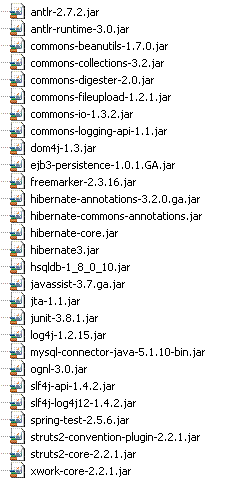
Jar files Used in the application
 |
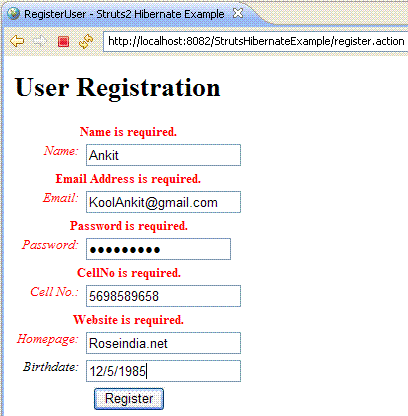
1-SignUp.jsp ADS_TO_REPLACE_1
|
<%@ page contentType="text/html; charset=UTF-8"%> <%@ taglib prefix="s" uri="/struts-tags"%> <html>ADS_TO_REPLACE_2 <head> <title>RegisterUser - Struts2 Hibernate Example</title> <s:head />ADS_TO_REPLACE_3 </head> <body> <h1>User Registration</h1>ADS_TO_REPLACE_4 <s:actionerror /> <s:form action="register" method="post"> <s:textfield name="name" label="Name" /> ADS_TO_REPLACE_5 <s:textfield name="emailId" label="Email" /> <s:password name="password" label="Password" /> <s:textfield name="cellNo" label="Cell No." /> ADS_TO_REPLACE_6 <s:textfield name="website" label="Homepage" /> <s:textfield name="birthDate" label="Birthdate" /> <s:submit value="Register" align="center" />ADS_TO_REPLACE_7 </s:form> </body> </html> |
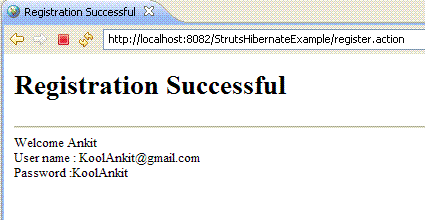
2-SignUpSuccess.jspADS_TO_REPLACE_8
|
<%@ page language="java" contentType="text/html; charset=UTF-8" pageEncoding="UTF-8"%> <!DOCTYPE html PUBLIC "-//W3C//DTD HTML 4.01 Transitional//EN"ADS_TO_REPLACE_9 "http://www.w3.org/TR/html4/loose.dtd"> <%@taglib prefix="s" uri="/struts-tags"%> <html>ADS_TO_REPLACE_10 <head> <meta http-equiv="Content-Type" content="text/html; charset=UTF-8"> <title>Registration Successful</title>ADS_TO_REPLACE_11 </head> <body> <h1>Registration Successful</h1><hr> ADS_TO_REPLACE_12 Welcome<s:property value="name" /><br> User name :<s:property value="emailId" /><br> Password : <s:property value="password" />ADS_TO_REPLACE_13 </body> </html> |
3-SignUpFail.jsp
|
<%@ page language="java" contentType="text/html; charset=UTF-8" ADS_TO_REPLACE_14 pageEncoding="UTF-8"%> <!DOCTYPE html PUBLIC "-//W3C//DTD HTML 4.01 Transitional//EN" "http://www.w3.org/TR/html4/loose.dtd">ADS_TO_REPLACE_15 <html> <head> <meta http-equiv="Content-Type" content="text/html; charset=UTF-8">ADS_TO_REPLACE_16 <title>Registration Failed</title> </head> <body>ADS_TO_REPLACE_17 <h1>Registration Failed</h1> <a href="SignUp.jsp">SignUp Again</a> </body>ADS_TO_REPLACE_18 </html> |
4-RegisterAction.java
|
package roseindia.view; import java.sql.Date;ADS_TO_REPLACE_19 import roseindia.dao.RegisterDao; import roseindia.model.Register; import com.opensymphony.xwork2.ActionSupport;ADS_TO_REPLACE_20 public class RegisterAction extends ActionSupport { private static final long serialVersionUID = 908606616890722294L; private String emailId, password, name, cellNo, website;ADS_TO_REPLACE_21 private Date birthDate; private Long id; public Long getId() {ADS_TO_REPLACE_22 return id; } public void setId(Long id) {ADS_TO_REPLACE_23 this.id = id; } public String getName() {ADS_TO_REPLACE_24 return name; } public void setName(String name) {ADS_TO_REPLACE_25 this.name = name; } public String getCellNo() {ADS_TO_REPLACE_26 return cellNo; } public void setCellNo(String cellNo) {ADS_TO_REPLACE_27 this.cellNo = cellNo; } public String getWebsite() {ADS_TO_REPLACE_28 return website; } public void setWebsite(String website) {ADS_TO_REPLACE_29 this.website = website; } public Date getBirthDate() {ADS_TO_REPLACE_30 return birthDate; } public void setBirthDate(Date birthDate) {ADS_TO_REPLACE_31 this.birthDate = birthDate; } public String getEmailId() {ADS_TO_REPLACE_32 return emailId; } public void setEmailId(String emailId) {ADS_TO_REPLACE_33 this.emailId = emailId; } public String getPassword() {ADS_TO_REPLACE_34 return password; } public void setPassword(String password) {ADS_TO_REPLACE_35 this.password = password; } public RegisterAction() {ADS_TO_REPLACE_36 } public String execute() throws Exception { Register Rgst = new Register();ADS_TO_REPLACE_37 Rgst.setCellNo(cellNo); Rgst.setWebsite(website); Rgst.setBirthDate(birthDate);ADS_TO_REPLACE_38 Rgst.setEmailId(emailId); Rgst.setName(name); Rgst.setPassword(password);ADS_TO_REPLACE_39 if (RegisterDao.registerUser(Rgst)) return "success"; else ADS_TO_REPLACE_40 return "fail"; } } |
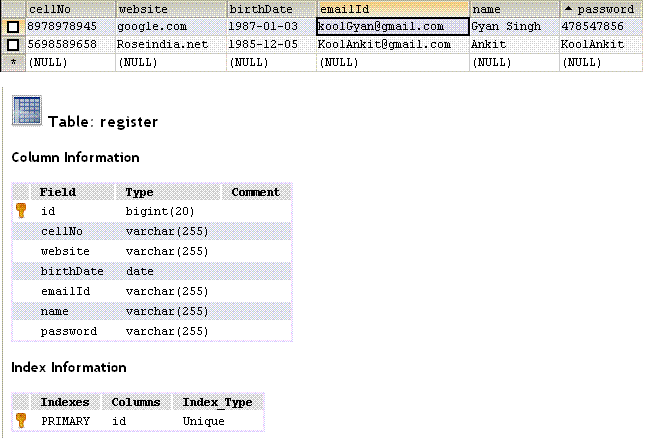
5 -Register.java - This class is used to mapped the Register table in the Mysql database, we use the annotation to provide metadata to the class and fields of the table. ADS_TO_REPLACE_41
|
package roseindia.model; import java.io.Serializable; import java.sql.Date;ADS_TO_REPLACE_42 import javax.persistence.Column; import javax.persistence.Entity; import javax.persistence.GeneratedValue;ADS_TO_REPLACE_43 import javax.persistence.Id; import javax.persistence.Table; @EntityADS_TO_REPLACE_44 @Table(name = "Register") public class Register implements Serializable { private static final long serialVersionUID = -6430275524165380638L;ADS_TO_REPLACE_45 private Long id; private String name; private String emailId;ADS_TO_REPLACE_46 private String password; private String cellNo; private String website;ADS_TO_REPLACE_47 private Date birthDate; @Id @GeneratedValue ADS_TO_REPLACE_48 @Column(name = "id") public Long getId() { return id;ADS_TO_REPLACE_49 } public void setId(Long id) { this.id = id;ADS_TO_REPLACE_50 } @Column(name = "name") public String getName() {ADS_TO_REPLACE_51 return name; } public void setName(String name) {ADS_TO_REPLACE_52 this.name = name; } @Column(name = "emailId")ADS_TO_REPLACE_53 public String getEmailId() { return emailId; }ADS_TO_REPLACE_54 public void setEmailId(String emailId) { this.emailId = emailId; }ADS_TO_REPLACE_55 @Column(name = "password") public String getPassword() { return password;ADS_TO_REPLACE_56 } public void setPassword(String password) { this.password = password;ADS_TO_REPLACE_57 } @Column(name = "cellNo") public String getCellNo() {ADS_TO_REPLACE_58 return cellNo; } public void setCellNo(String cellNo) {ADS_TO_REPLACE_59 this.cellNo = cellNo; } @Column(name = "website")ADS_TO_REPLACE_60 public String getWebsite() { return website; }ADS_TO_REPLACE_61 public void setWebsite(String website) { this.website = website; }ADS_TO_REPLACE_62 @Column(name = "birthDate") public Date getBirthDate() { return birthDate;ADS_TO_REPLACE_63 } public void setBirthDate(Date birthDate) { this.birthDate = birthDate;ADS_TO_REPLACE_64 } } |
6 - RegisterDao.java - This class is based on DAO (Data Access Object ) design pattern and used for accessing the hibernate from action.
|
package roseindia.dao;ADS_TO_REPLACE_65 import roseindia.dao.HibernateUtil; import roseindia.model.Register; import org.hibernate.Session;ADS_TO_REPLACE_66 import org.hibernate.SessionFactory; import org.hibernate.Transaction; public class RegisterDao {ADS_TO_REPLACE_67 public static boolean registerUser(Register Rgst) { SessionFactory sf = HibernateUtil.getSessionFactory(); Transaction t = null;ADS_TO_REPLACE_68 try { Session s = sf.openSession(); t = s.beginTransaction(); // start a new transaction ADS_TO_REPLACE_69 s.persist(Rgst); t.commit(); // commit transaction return true;ADS_TO_REPLACE_70 } catch (Exception ex) { System.err.println("Error -->" + ex.getMessage()); if (t != null)ADS_TO_REPLACE_71 t.rollback(); return false; }ADS_TO_REPLACE_72 } } |
7 - HibernateUtil.java - This class creates the SessionFactory object and return it. The method AnnotationConfiguration() is used to get the support of annotation for hibernate.
package roseindia.dao;ADS_TO_REPLACE_73
import org.hibernate.cfg.AnnotationConfiguration;
import org.hibernate.SessionFactory;
public class HibernateUtil {ADS_TO_REPLACE_74
private static final SessionFactory sessionFactory;
static {
try {ADS_TO_REPLACE_75
sessionFactory = new AnnotationConfiguration().configure()
.buildSessionFactory();
} catch (Throwable ex) {ADS_TO_REPLACE_76
System.err.println("Initial SessionFactory creation failed." + ex);
throw new ExceptionInInitializerError(ex);
}ADS_TO_REPLACE_77
}
public static SessionFactory getSessionFactory() {
return sessionFactory;ADS_TO_REPLACE_78
}
}
8 package.properties
|
requiredstring = ${getText(fieldName)} is required. ADS_TO_REPLACE_79 requiredemail = ${getText(fieldName)} is not in correct format. requiredpassword = ${getText(fieldName)} should be more than 6 character. requiredinteger = ${getText(fieldName)} should be numeric. ADS_TO_REPLACE_80 password = Password name = Name emailId = Email Address ADS_TO_REPLACE_81 website = Website cellNo = CellNo |
9 struts.xml - In this file we do the action mapping.
|
<?xml version="1.0" encoding="UTF-8" ?>ADS_TO_REPLACE_82 <!DOCTYPE struts PUBLIC "-//Apache Software Foundation//DTD Struts Configuration 2.0//EN" "http://struts.apache.org/dtds/struts-2.0.dtd">ADS_TO_REPLACE_83 <struts> <constant name="struts.enable.DynamicMethodInvocation" value="false" /> <constant name="struts.devMode" value="false" /> ADS_TO_REPLACE_84 <package name="default" extends="struts-default"> <action name="register" class="roseindia.view.RegisterAction"> <result name="input">/SignUp.jsp</result> ADS_TO_REPLACE_85 <result name="success">/SignUpSuccess.jsp</result> <result name="fail">/SignUpFail.jsp</result> </action>ADS_TO_REPLACE_86 </package> </struts> |
10 hibernate.cfg.xml - The hibernate.cfg.xml file is hibernate configuration file and it is used to configure the Register table in the gyan database.
|
<?xml version='1.0' encoding='utf-8'?>ADS_TO_REPLACE_87 <!DOCTYPE hibernate-configuration PUBLIC "-//Hibernate/Hibernate Configuration DTD 3.0//EN" "http://hibernate.sourceforge.net/hibernate-configuration-3.0.dtd">ADS_TO_REPLACE_88 <hibernate-configuration> <session-factory> <!-- Database connection settings --> ADS_TO_REPLACE_89 <property name="connection.driver_class"> com.mysql.jdbc.Driver </property> <property name="connection.url"> ADS_TO_REPLACE_90 jdbc:mysql://localhost:3306/gyan </property> <property name="connection.username">root</property> ADS_TO_REPLACE_91 <property name="connection.password">root</property> <!-- JDBC connection pool (use the built-in) --> <property name="connection.pool_size">1</property>ADS_TO_REPLACE_92 <!-- SQL dialect --> <property name="dialect">org.hibernate.dialect.MySQLDialect </property>ADS_TO_REPLACE_93 <!-- Enable Hibernate's automatic session context management --> <property name="current_session_context_class">thread</property> <!-- Disable the second-level cache --> ADS_TO_REPLACE_94 <property name="cache.provider_class"> org.hibernate.cache.NoCacheProvider </property>ADS_TO_REPLACE_95 <!-- Echo all executed SQL to stdout --> <property name="show_sql">true</property> <!-- Drop and re-create the database schema on startup --> ADS_TO_REPLACE_96 <property name="hbm2ddl.auto">update</property> <mapping class="roseindia.model.Register" /> </session-factory>ADS_TO_REPLACE_97 </hibernate-configuration> |
11- RegisterAction-Validation.xml
|
<!DOCTYPE validators PUBLIC "-//OpenSymphony Group//XWork Validator 1.0.2//EN"ADS_TO_REPLACE_98 "http://www.opensymphony.com/xwork/xwork-validator-1.0.2.dtd"> <validators> <field name="name"> ADS_TO_REPLACE_99 <field-validator type="requiredstring"> <message key="requiredstring" /> </field-validator> ADS_TO_REPLACE_100 </field> <field name="password"> <field-validator type="requiredstring"> ADS_TO_REPLACE_101 <message key="requiredstring" /> </field-validator> <field-validator type="stringlength"> ADS_TO_REPLACE_102 <param name="minLength">6</param> <param name="trim">true</param> <message key="requiredpassword" /> ADS_TO_REPLACE_103 </field-validator> </field> <field name="emailId"> ADS_TO_REPLACE_104 <field-validator type="requiredstring"> <message key="requiredstring" /> </field-validator> ADS_TO_REPLACE_105 <field-validator type="email"> <message key="requiredemail" /> </field-validator> ADS_TO_REPLACE_106 </field> <field name="website"> <field-validator type="requiredstring"> ADS_TO_REPLACE_107 <message key="requiredstring" /> </field-validator> </field> ADS_TO_REPLACE_108 <field name="cellNo"> <field-validator type="requiredstring"> <message key="requiredstring" /> ADS_TO_REPLACE_109 </field-validator> <field-validator type="stringlength"> <param name="minLength">10</param> ADS_TO_REPLACE_110 <message key="requiredinteger" /> </field-validator> </field>ADS_TO_REPLACE_111 </validators> |
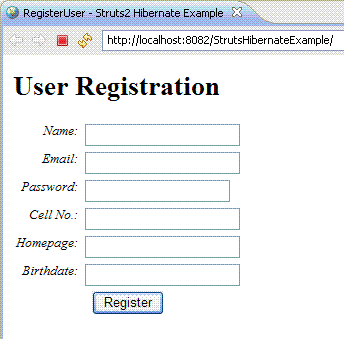
SignUp.jsp
 ADS_TO_REPLACE_112
required.gif
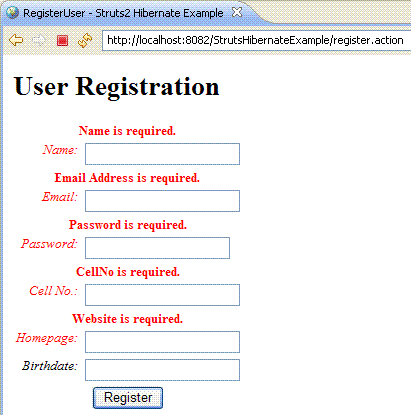
Incorrect.gifADS_TO_REPLACE_113
Success.gif
 ADS_TO_REPLACE_114
DatabaseTableData.gif
Download Select Source CodeADS_TO_REPLACE_115
Advertisements
Ads
Ads
